Chapter 5
Cooling
Every watt of electricity a data center draws eventually turns into heat, and getting that heat out of the building fast enough to keep the chips from cooking themselves has become one of the hardest, most urgent engineering problems in the entire AI buildout.
Why Chips Get Hot
Start with a single transistor — the tiny on/off switch introduced in Chapter 1, the basic building block of every chip. Every time a transistor flips from off to on or on to off, a small amount of the electrical energy passing through it doesn't do useful work. It gets wasted, and wasted electrical energy has to become something. It becomes heat — the same way rubbing your hands together turns the energy of motion into warmth, or the way a car's brakes get hot by turning the energy of motion into friction. One transistor switching once wastes an amount of heat too small to measure by hand. But a modern AI chip contains tens of billions of transistors, and it isn't switching them once — it's switching enormous numbers of them billions of times per second, continuously, for as long as it's running.
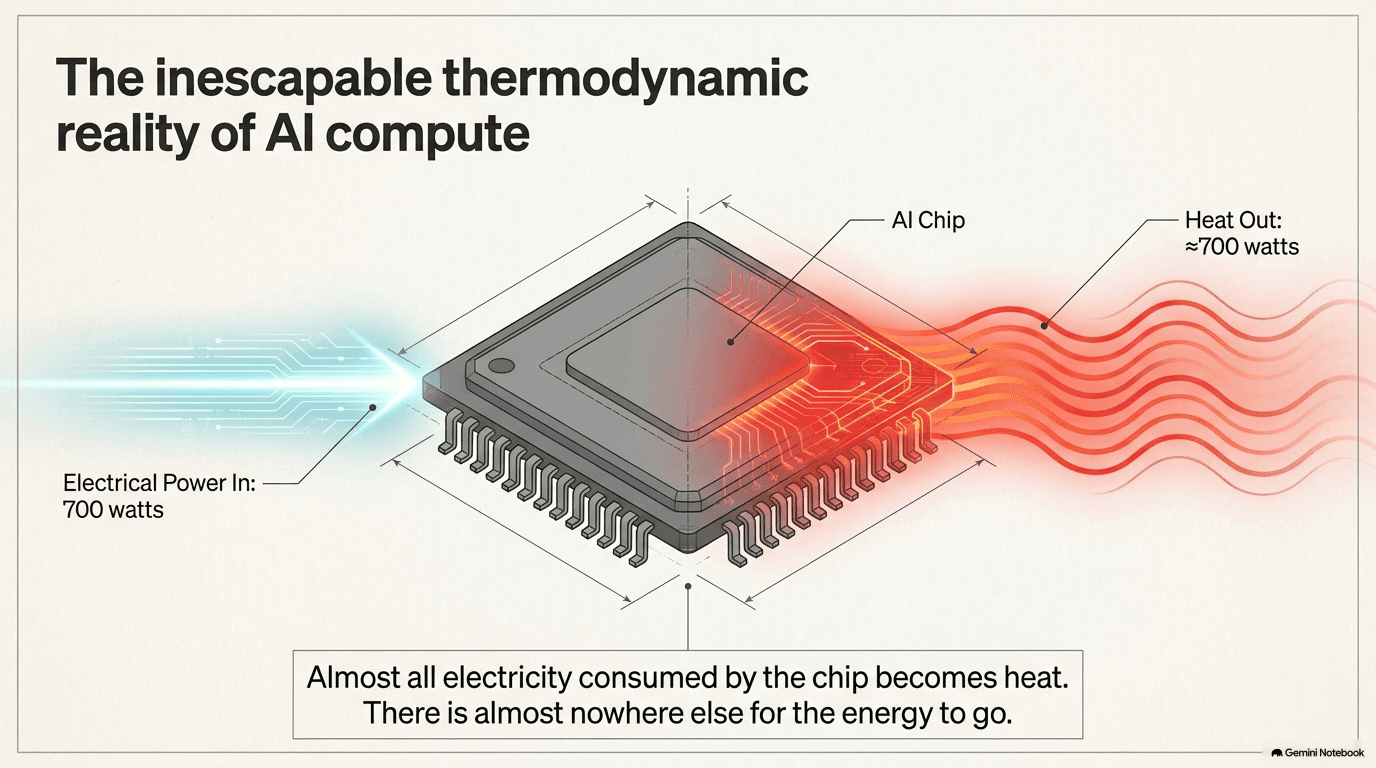
That adds up to a rule that turns out to be almost embarrassingly simple, and it's the single most important idea in this entire chapter: essentially every watt of electricity a chip consumes comes back out as heat. A chip doesn't "use" electricity the way a lightbulb uses electricity to make light and only a little bit of heat as a byproduct — for a computer chip, heat basically is the byproduct, nearly all of it. If a chip is drawing 700 watts of power to do its calculations, it is also, at the very same moment, generating very close to 700 watts of heat that has to go somewhere. There's no way around this. It's a direct consequence of how transistors work, not a design flaw someone could someday fix. Removing that heat, continuously, for as long as the chip is turned on, is not an optional nicety — it's a requirement as basic as supplying the chip with electricity in the first place. A chip that can't shed its heat fast enough will automatically slow itself down to avoid damaging itself (a built-in safety behavior called throttling, covered later in this section), or, in the worst case, it will overheat and fail outright.
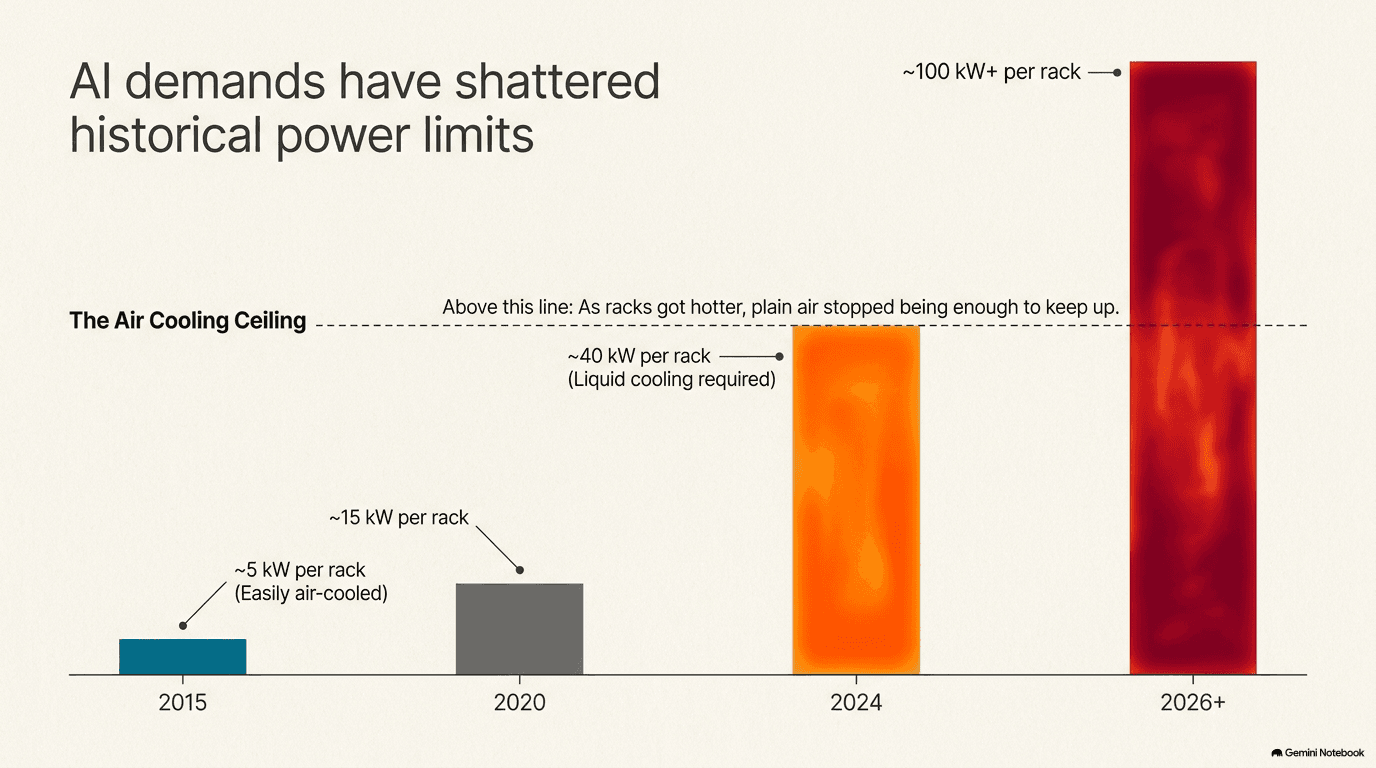
This would be a manageable problem if chip power draw had stayed roughly where it was a decade ago. It hasn't — it's exploded, and the pace of that explosion is really the whole story of why cooling has become such an urgent topic across the entire AI buildout. An NVIDIA H100 GPU, one of the workhorse chips of the first wave of the AI boom (introduced in Chapter 1), draws around 700 watts running at full tilt — about seven times what a typical hair dryer uses, coming out of a chip smaller than a deck of cards. The generation of chips that followed it, built around designs like NVIDIA's B200 and GB300, is heading toward 1,000 to 1,200 watts per chip. That's not a modest step up — it's close to doubling the heat problem in a single product generation, and there's no sign the trend is leveling off.
Multiply that by the way chips are actually deployed and the numbers get genuinely dramatic. Chapter 2 described how GPUs are packed eight to a server, and Chapter 3 described how those servers are stacked into racks. A single server carrying eight of today's highest-power GPUs can draw over 5,000 watts on the chips alone, before counting the CPUs, memory, networking gear, and everything else that shares the box. A full rack of those servers — the refrigerator-sized frame that anchors an entire row of a data center's floor, described in Chapter 3 — can draw 20,000 to 40,000 watts. The next generation of rack designs, built for the newest chips, is heading toward 100,000 watts and beyond, from a single rack occupying roughly the same footprint as a large kitchen refrigerator. To make that number tangible: 100 kilowatts is enough continuous power to run about thirty typical American homes, all coming out of one floor-to-ceiling frame of equipment, and every watt of it becomes heat that has to be carried away, every second, for as long as the rack is switched on. It is, quite literally, the heat output of a small bonfire — except a bonfire eventually burns down, and this one runs twenty-four hours a day, seven days a week, for years.
The industry has a single number it uses to talk about how efficiently a data center handles this overhead, and it's worth knowing because it comes up constantly in any serious discussion of data center design: PUE, or Power Usage Effectiveness. PUE is simply the total amount of power a facility draws from the grid, divided by the amount of power that actually reaches the computing equipment doing useful work. A PUE of 1.0 would mean every single watt entering the building goes straight to computing, with zero overhead for anything else — a theoretical perfect score no real facility hits. Good modern data centers manage somewhere around 1.1 to 1.3, meaning for every 100 watts reaching the computers, the building as a whole is drawing 110 to 130 watts. Older or less efficient facilities can run at 1.5 or worse. Cooling is, by a wide margin, the single biggest source of that overhead — the pumps, fans, chillers, and cooling towers described later in this chapter all consume power of their own, on top of the power the chips themselves use, simply to keep those chips alive. That's the reason so much money, engineering talent, and corporate attention across the entire AI buildout is now aimed squarely at cooling: shaving even a small amount off a facility's PUE, at the scale hyperscale campuses operate, translates into a genuinely enormous amount of saved electricity — electricity that costs money and, in many regions, is the scarcest resource of all (a theme Chapter 4 introduced in the context of site selection, and Chapter 13 returns to in the context of the wider grid).
Air Cooling — The Old Way
For essentially the entire history of the modern data center, before the AI-driven density explosion described in section 5.1, the answer to "how do you keep a room full of computers cool" was the same answer you'd give for keeping an office cool: air conditioning. Specialized industrial versions of the same basic idea that cools a house — units called CRAC (Computer Room Air Conditioning) and CRAH (Computer Room Air Handling) systems — chill air and push it through the server room. The distinction between the two is mostly about plumbing: a CRAC unit has its own built-in refrigeration system, working much like a window air conditioner scaled up to industrial size, while a CRAH unit instead relies on chilled water piped in from a separate central cooling plant (introduced in section 5.4) and simply blows air across a coil that water flows through, the way a car's heater core works in reverse. Either way, the goal is identical: take warm room air, make it cold, and send it back out.
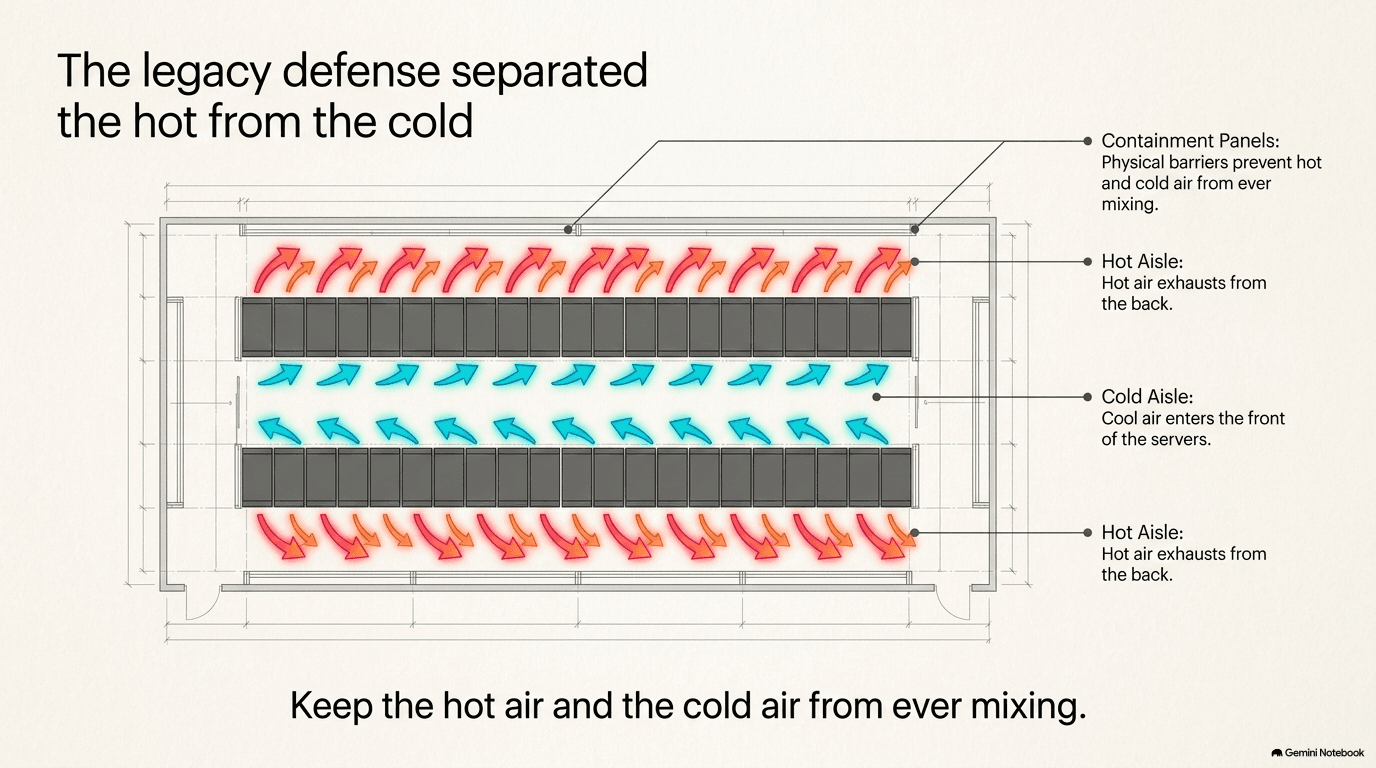
That cold air doesn't just get dumped into the room randomly — it's carefully directed using an arrangement Chapter 3 introduced in the context of rack layout: hot aisle / cold aisle. Racks are arranged in rows that face each other in pairs, front to front, with cold air delivered into the aisle between the facing fronts. Servers pull that cold air in through their front, pass it over their hot components, and exhaust it out the back — into a separate aisle, the hot aisle, shared by the backs of two rows facing away from each other. Physical barriers — plastic curtains, solid panels, sometimes entire enclosed containment structures — keep the hot aisle's exhaust air from mixing back into the cold aisle before it's had a chance to be cooled again and recirculated. Picture a swimming pool with a shallow end and a deep end, and a rope keeping swimmers from drifting between them: hot aisle / cold aisle containment is the same idea applied to air instead of water, keeping two states of the same substance cleanly separated so neither one contaminates the other.
This approach worked, essentially unchanged in its fundamentals, for more than two decades, comfortably handling racks drawing anywhere from about 5 to 15 kilowatts (a kilowatt is 1,000 watts — so 15 kilowatts means 15,000 watts, or roughly what fifteen household space heaters produce). And it is worth being clear about something important: air cooling isn't some outdated technology the industry is discarding wholesale. It remains a large, genuinely necessary part of every data center being built today — including the most advanced AI-focused facilities on Earth — for a simple reason covered more in section 5.3: even a fully liquid-cooled AI rack still has plenty of components that aren't the GPUs themselves. Memory modules, storage drives, networking equipment (Chapter 3), and power supplies still rely on air moving across them, and the room as a whole still needs air conditioning for humidity control and for all the parts of a data center campus that aren't the highest-density AI racks at all. So air cooling isn't dying — it's being narrowed to the jobs it's still good at, while a new technology takes over the job it can no longer do.
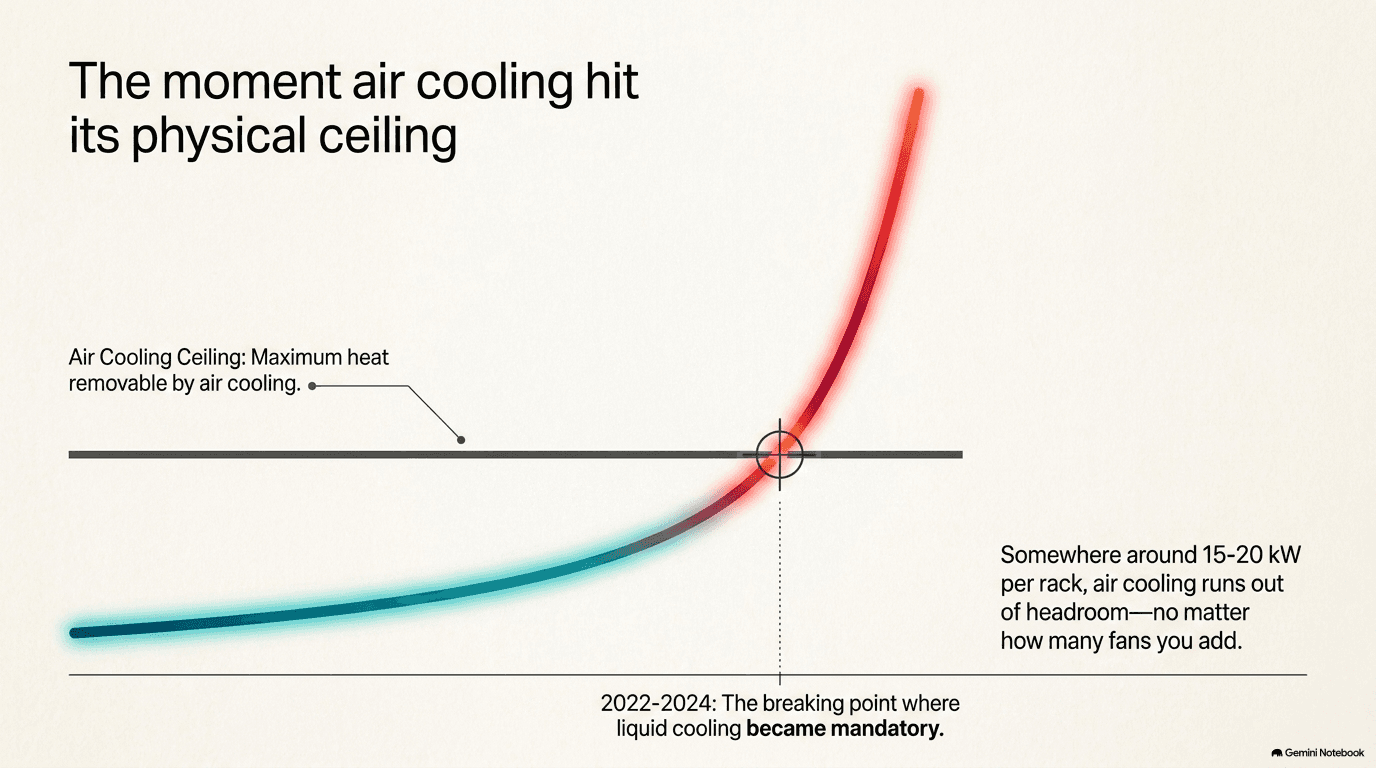
That job — the one air simply cannot do anymore — is cooling the chip itself. And this is where the physics stops being flexible. There is a hard limit on how much heat you can carry away by blowing air past a hot surface, set by how much heat a given volume of air can actually absorb and how fast a fan can physically move that air without the noise, the power draw, and the sheer size of the equipment becoming absurd. A chip drawing 100 or 200 watts sits comfortably within that limit — air-cooled heat sinks (the finned metal blocks that sit on top of a chip, increasing its surface area so more air can carry heat away, familiar from the inside of any desktop computer) have handled chips in that range for years. But a chip drawing 700 watts, packed eight-to-a-server into a rack pulling 40 kilowatts or more, is on the wrong side of that limit. You can point more and bigger fans at it, and the industry did, for a while — but past a certain density, no amount of moving air, however forcefully, can extract the heat fast enough. The chip will throttle itself to survive, undoing the very performance gains it was built to deliver, or it will fail. This is the wall the whole rest of this chapter is really about: air cooling ran out of physical headroom, at almost exactly the moment AI chips needed dramatically more of it.
Several companies that have long made industrial air-handling equipment for buildings of every kind — office towers, hospitals, factories — sit squarely in this space, and they illustrate something worth pointing out explicitly: cooling a data center is not a single specialized industry invented for AI. It's an extension of climate-control and industrial-refrigeration expertise that already existed, redirected at a new and much more demanding customer. AAON makes premium air-handling and chiller units, including designs specifically engineered for the airflow patterns and free-cooling opportunities (using naturally cool outside air instead of mechanical refrigeration whenever the climate allows it) that data centers look for. Carrier, Johnson Controls, and Trane Technologies — three companies whose names are more commonly associated with the air conditioner humming outside a house or the rooftop units on a shopping mall — have all become significant suppliers into data centers as well, precisely because the underlying engineering (moving and conditioning large volumes of air reliably, at scale, for decades without failure) transfers directly. It's a useful thing to notice about the whole AI buildout, and this chapter is one of the clearest examples of it: a lot of the companies now central to building AI infrastructure got there not by inventing something new, but by being extremely good at something old that AI suddenly needed a great deal more of.
Liquid Cooling — The New Way
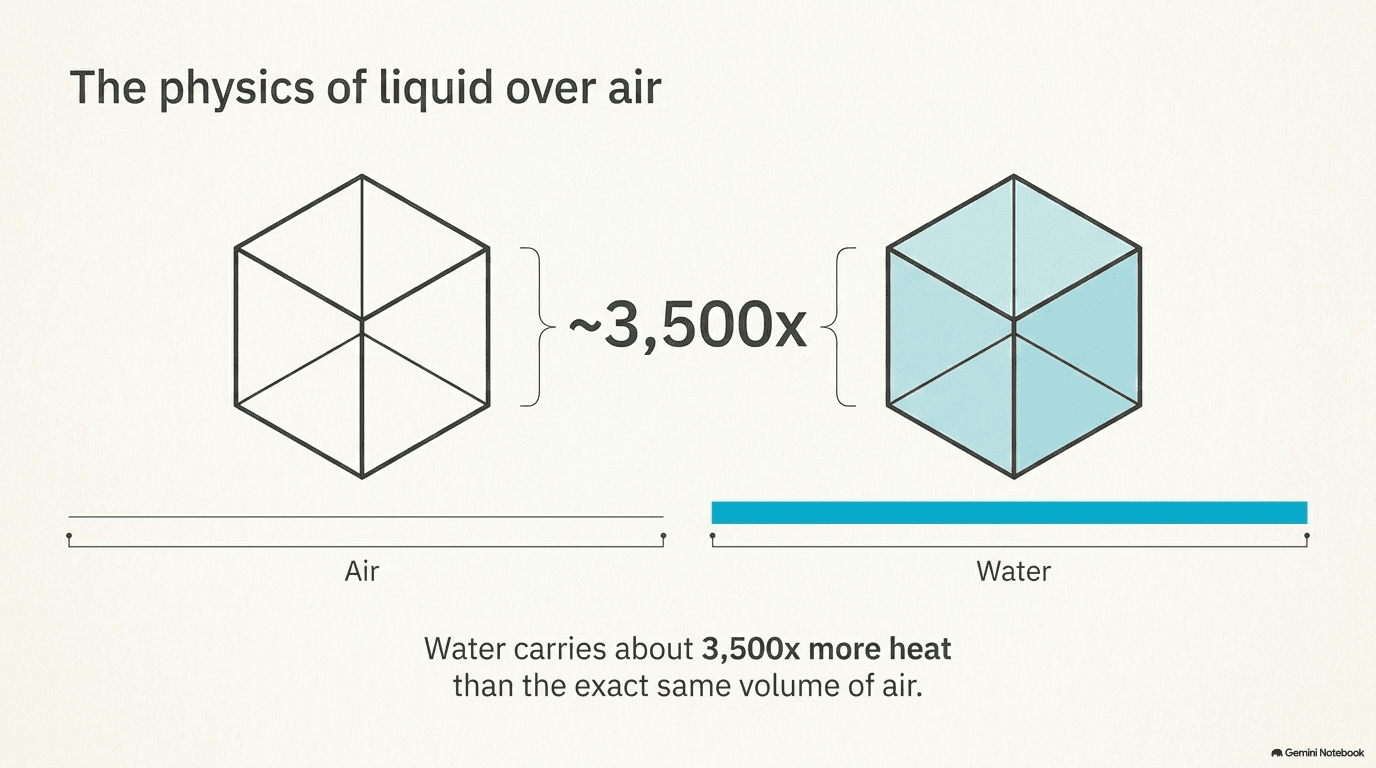
If air can't carry away enough heat fast enough, the obvious next question is: what can? The answer the industry has converged on is liquid — specifically, bringing a cooling liquid into direct or near-direct contact with the hottest components instead of relying on air as the middleman. The physical reason this works so much better comes down to a basic property of water that's worth sitting with for a moment, because it explains everything else in this section: a given volume of water can carry roughly 3,500 times more heat than the same volume of air. Air is mostly empty space between widely spaced molecules; water is densely packed. A fixed volume of water simply has vastly more material available to absorb and carry away thermal energy than the same volume of air does. This is the same reason a swimming pool on a hot day feels shockingly cold compared to the warm air above it, and the same reason a radiator in a car uses liquid coolant, not just a fan blowing across the hot engine block directly — engineers have known for well over a century that liquid is a dramatically more efficient way to move heat than air. The AI industry is now applying that century-old principle at a scale and an urgency it has never needed to before.
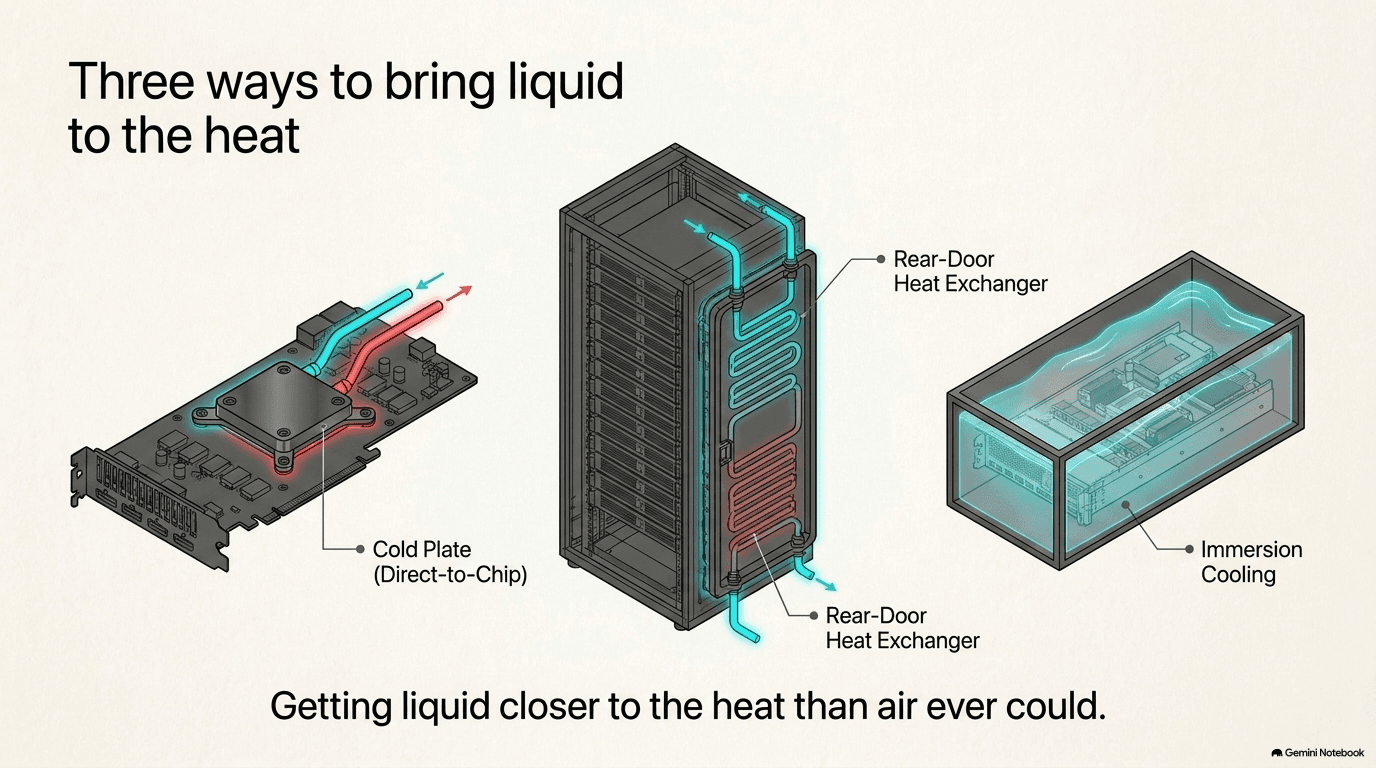
There are a few distinct ways of actually getting that liquid where the heat is, and it's worth understanding each one, because they solve slightly different problems and different facilities use different combinations of them.
Direct-to-chip cooling is the fastest-growing and, for the highest-power AI chips, the dominant approach. A metal plate — called a cold plate — is bolted directly onto the top of the GPU, in exactly the spot where an air-cooled heat sink would normally sit. Instead of relying on fins and airflow, the cold plate has tiny internal channels running through it, and a liquid coolant is pumped through those channels, picking up heat directly from the chip's surface and carrying it away in a continuous loop — very much like the radiator in a car, except instead of sitting a foot away from the engine with a fan in between, it's bolted directly onto the hottest single component in the entire system. Because the liquid touches metal that's touching the chip almost directly, with none of air's inefficiency in between, direct-to-chip cooling can remove far more heat from far less space than any air-based approach ever could.
Rear-door heat exchangers take a different approach that doesn't require modifying the servers or the chips at all. Instead of cooling the chip directly, a liquid-cooled panel is mounted on the back of the rack, in place of (or in addition to) the ordinary rear door. As the rack's own internal fans exhaust hot air out the back — the same hot-aisle exhaust described in section 5.2 — that air passes through the rear-door heat exchanger first, getting cooled by liquid flowing through the door before it ever reaches the room's hot aisle at all. It's a way of capturing heat one step later in the process than direct-to-chip cooling does, and it has the advantage of being easier to retrofit onto existing rack designs that weren't originally built with liquid cooling in mind.
Immersion cooling is the most dramatic approach of the three, and the least widely deployed at scale so far. Instead of bringing liquid to specific hot components, entire servers are submerged directly into a bath of specially engineered fluid that doesn't conduct electricity — meaning the electronics can sit fully underwater (or under-fluid) without short-circuiting, the same way you could safely submerge a circuit board in cooking oil but never in ordinary tap water. The fluid absorbs heat from every surface of the server simultaneously, not just the hottest chip, and is then pumped out to be cooled and recirculated. It's an elegant idea, and it removes heat extremely effectively — but it also requires servers, racks, and entire maintenance workflows to be redesigned around a very different physical form factor than the industry has used for decades, which is a large part of why it remains the least common of the three approaches, even as interest in it grows.
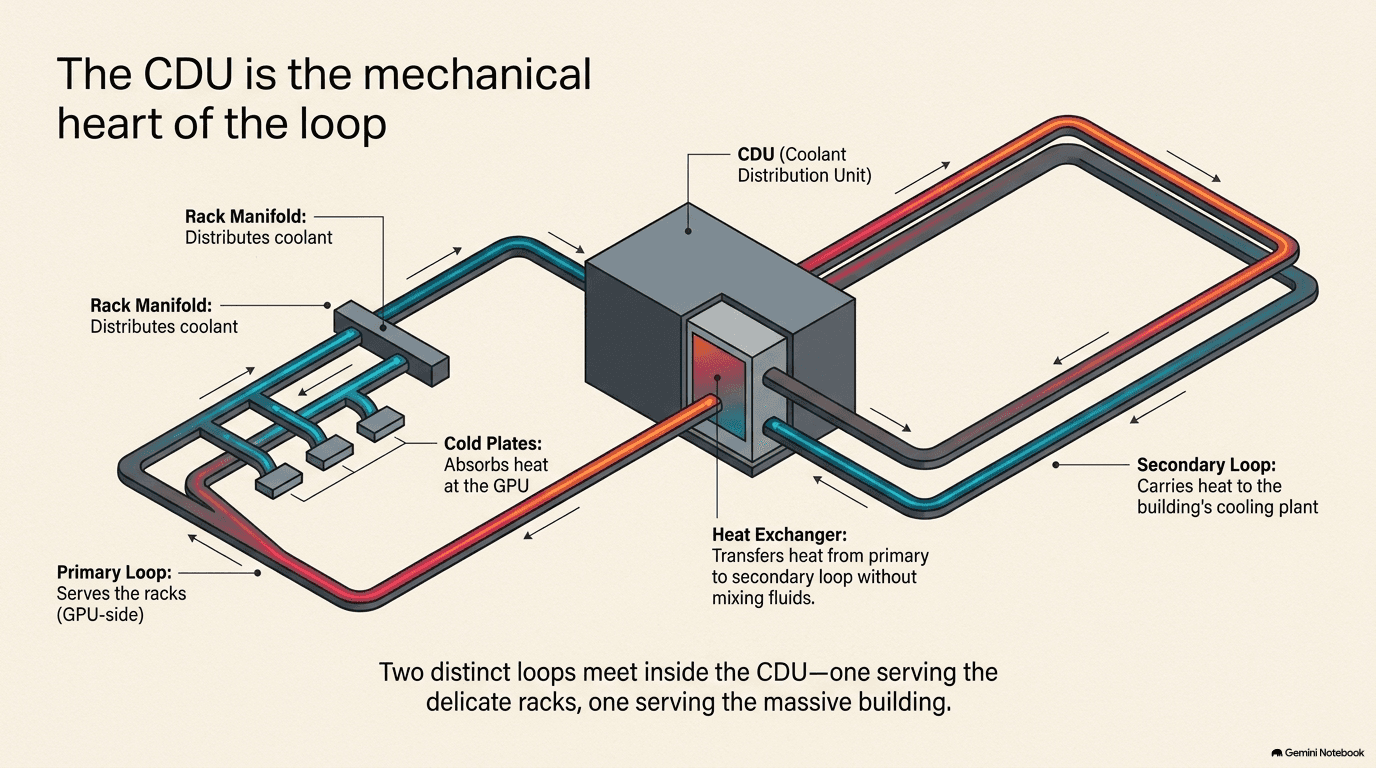
Whichever method gathers the heat, it all has to go somewhere, and that "somewhere" is a device called the CDU — the coolant distribution unit. Think of the CDU as the heart of the entire liquid-cooling system, in the most literal sense of that comparison: just as a heart pumps blood through a body, picking up and delivering nutrients and oxygen as it circulates, a CDU pumps coolant through the racks, picking up heat from the cold plates or rear doors and carrying it out to wherever the building's larger cooling system (section 5.4) can finally reject it to the outside world. Inside a CDU sits a pump to keep the liquid moving, a heat exchanger to transfer heat from the rack-side loop to the building-side loop without necessarily mixing the two fluids directly, and monitoring equipment to keep watch on temperature, flow rate, and pressure. A single CDU might serve one rack or several, depending on the design, but every liquid-cooled data center has some version of this device sitting between the racks doing the fine-grained work and the building's cooling plant doing the heavy lifting.
The plumbing details matter more than they might sound like they should, because a data center is not a static installation — servers get swapped out, upgraded, and repaired constantly, and none of that can be allowed to interrupt the cooling loops serving every other server in the rack. This is where quick-disconnect couplings come in: specialized fittings that let a technician unplug a single liquid-cooled server from its coolant lines — to swap it out, service it, or replace it — without draining the entire loop or spilling coolant across a room full of live electrical equipment. Parker Hannifin is a major maker of exactly this kind of fitting, drawing on decades of experience building quick-disconnect and fluid-handling components for industries — aerospace, industrial machinery — where a fluid leak has always been an expensive, sometimes dangerous failure to avoid. Inside the CDUs themselves, Dover makes compact heat exchangers engineered to move as much heat as possible through as small a footprint as possible, since every CDU is itself competing for limited space on a crowded data center floor. And more broadly, Ingersoll Rand supplies pumps and fluid-handling equipment that liquid-cooling loops depend on to keep coolant circulating reliably, around the clock, for years without a failure. The manifolds and distribution hardware that route coolant from the CDU out to each individual rack and back — essentially the plumbing junctions of the whole system — are a business nVent has built out, while Modine, a company with a long history in thermal management for vehicles and industrial equipment, has extended that same heat-exchange expertise into data-center liquid cooling.
Pulling the whole liquid-cooling stack together — cold plates at the chip, CDUs at the rack, and the integrated design connecting the two into one coherent system — Vertiv has established itself as one of the leading suppliers spanning the entire thermal stack, from the component sitting directly on the GPU to the systems engineering that ties an entire data hall's liquid cooling together. That "full stack" positioning matters, because liquid cooling isn't really a single product a data center buys off a shelf — it's an integrated system where the cold plate, the tubing, the CDU, and the building-side loop all have to be engineered to work together, and companies that can deliver more of that system as one coherent design have an advantage over those supplying only a single piece of it.
The Cooling Plant — Getting Heat Out of the Building
Everything covered so far in this chapter solves one specific problem: getting heat off the chip and out of the rack. But that heat hasn't actually gone anywhere yet — it's simply been transferred from the GPU to a liquid loop, and that loop is still inside the building. The final job, and in some ways the most fundamental one, is getting that heat out of the building entirely and into the one place large enough to absorb it without limit: the outside atmosphere. That's the job of the cooling plant — a dedicated mechanical facility, usually housed in its own building or a clearly separated section of the data center campus (as Chapter 4 described in its walk-through of a data center's major rooms), whose entire purpose is rejecting heat to the outside world.
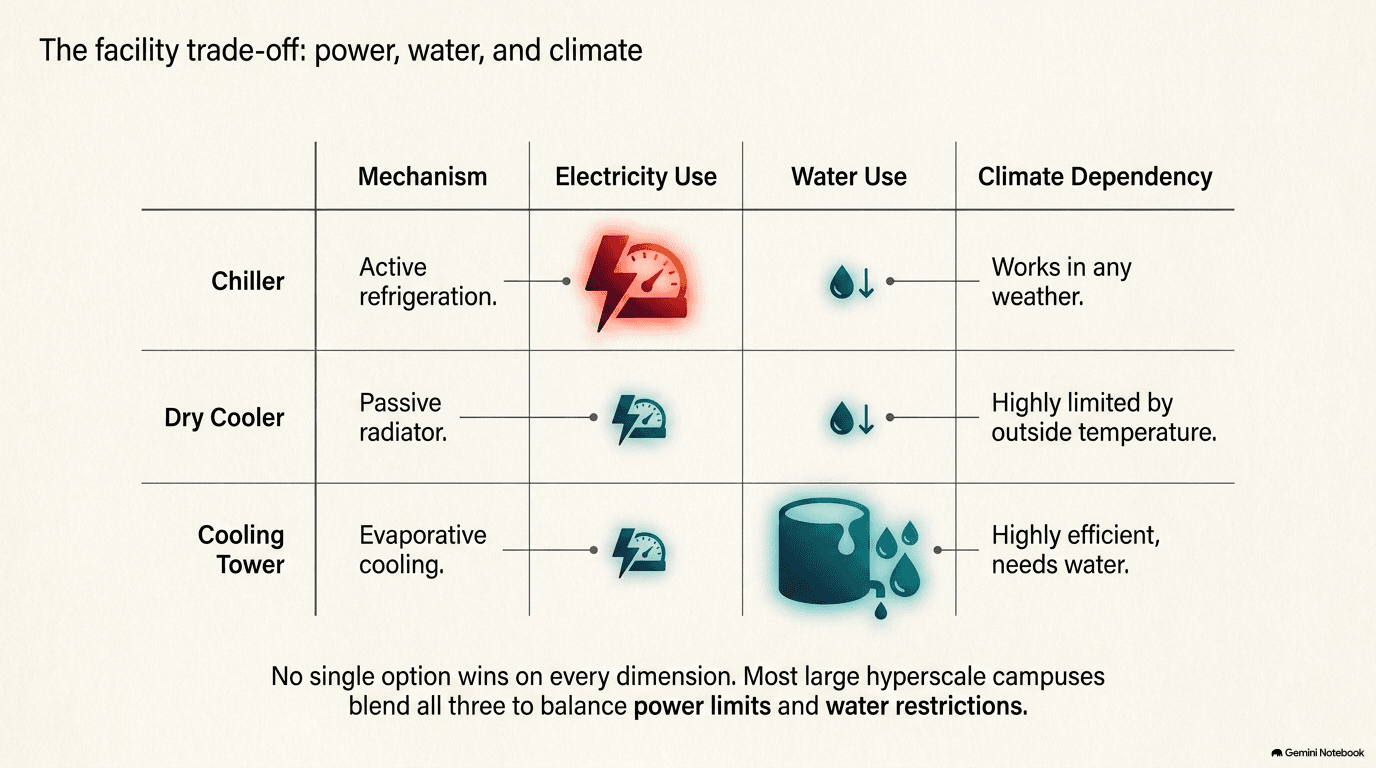
There are three main ways to do this, and each involves a real tradeoff — there is no option here that is simply better than the others in every situation, which is why most large facilities end up using some combination of all three, chosen based on climate and design goals.
Chillers work like a giant, industrial-scale version of a refrigerator or an air conditioner: they use a refrigeration cycle — compressing and expanding a refrigerant gas to actively pump heat from a cooler place (the water in the building's cooling loop) to a warmer place (the outside air), which is the opposite direction heat normally wants to flow on its own. That "against the grain" direction is exactly why chillers work in essentially any climate and any outdoor temperature, but it's also why they're the most electricity-hungry option of the three: actively pumping heat uphill, so to speak, takes real energy, and chillers are consistently the single biggest contributor to a data center's PUE overhead described back in section 5.1.
Dry coolers take the opposite approach: no active refrigeration cycle at all, just large radiator-like coils with fans blowing outside air across them, letting heat flow the way it naturally wants to — from the warmer water inside the loop to the cooler air outside. This is far simpler and dramatically less power-hungry than a chiller, but it comes with an obvious limitation: it only works when the outside air is actually cooler than the water needs to be. On a very hot day, in a very hot climate, a dry cooler alone may not be able to get the water cold enough, which is why dry coolers are often paired with chillers as a backup, or favored specifically in cooler climates where "free cooling" — using naturally cool outside air instead of energy-intensive mechanical refrigeration, whenever conditions allow — can carry a large share of the annual cooling load without power-hungry help.
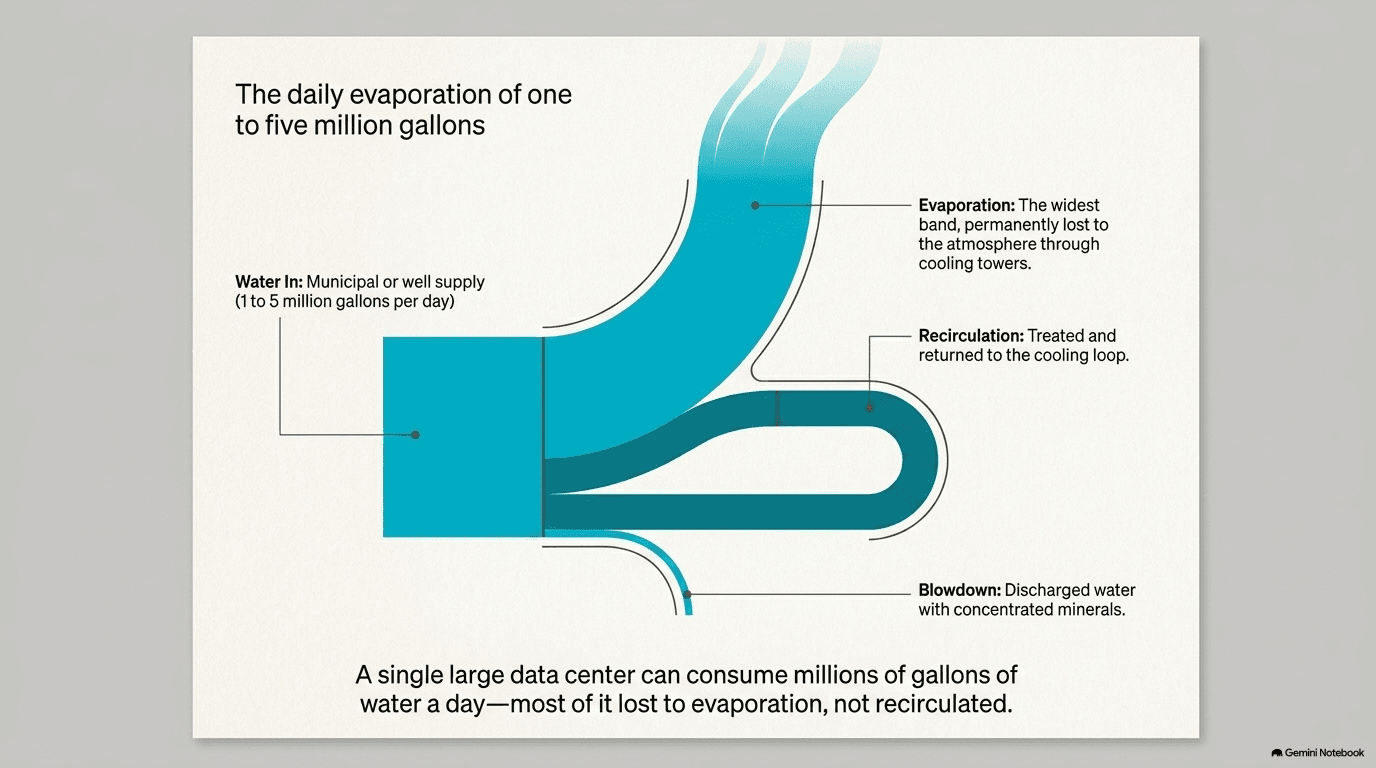
Cooling towers use a third method entirely: evaporation. Warm water from the building's cooling loop is sprayed or trickled over a large surface area inside the tower, exposed to a flow of outside air, and a portion of that water evaporates — exactly the same physical process that cools your skin when sweat evaporates off it on a hot day. Evaporation is thermodynamically very efficient at shedding heat, which makes cooling towers one of the most effective and lowest-power ways to reject a large amount of heat. But that efficiency comes at a direct cost that the other two methods don't have: the evaporated water is gone, consumed rather than recirculated, and a large facility running cooling towers as its primary heat-rejection method can use an enormous amount of water doing it — a cost significant enough that it gets an entire section of its own next.
Most large, modern data center campuses don't pick just one of these three approaches — they use some blend, engineered around the specific climate they're built in and the specific tradeoff between water use, electricity use, and reliability the operator wants to strike. A facility in a cool, dry climate might lean heavily on dry coolers and free cooling for most of the year, falling back on chillers only during the hottest stretches. A facility in a hot, humid climate might need chillers running much more of the time. And a facility trying to minimize its water footprint might favor chillers and dry coolers over cooling towers even at some cost in electricity efficiency, or invest in more sophisticated closed-loop hybrid designs that try to capture some of a cooling tower's efficiency without its full water appetite.
A specialist company sits at the center of the cooling-tower side of this picture: SPX Technologies describes itself as a global leader specifically in cooling towers built for data centers, the large evaporative structures — often visible as distinctive geometric shapes on a data center campus's exterior — that handle the heat-rejection job cooling towers are built for. And the same companies introduced in section 5.2 for their air-handling businesses — Carrier, Johnson Controls, and Trane — also make chillers, which is worth restating explicitly: these are not "air-only" companies whose relevance stops at the CRAC unit. They span both sides of the cooling story, air handling for the room and chillers for the plant, which is exactly why it's more accurate to think of them as full-range thermal-management companies than to sort them into an "air" bucket separate from a "liquid" bucket. Cooling a modern AI data center is one continuous engineering problem, from the chip's surface all the way out to the sky, and the companies solving pieces of it tend to show up on more than one link of that chain.
Water — The Hidden Resource
Follow the heat all the way to a cooling tower, and a cost shows up that almost never makes it into a headline about a new AI data center, even though it's become one of the more closely watched constraints in the entire buildout: water. A single large data center, cooling itself primarily through evaporative cooling towers, can use somewhere between one and five million gallons of water per day — not per year, per day, continuously, for as long as the facility is running. To put a single data point on that: a 50-megawatt data center, a mid-sized facility by current AI-campus standards, might use on the order of a million gallons of water daily, roughly comparable to the water use of a small town, coming out of one industrial site.
That water isn't as simple as pouring it in and letting it evaporate. It has to be treated, continuously, to keep the cooling loop functioning and to keep the equipment inside it from being damaged. Left untreated, water circulating through a cooling system will cause scaling — mineral deposits building up on interior surfaces, the same white crust that forms inside an old kettle, except here it's forming inside pipes and heat exchangers where it reduces how efficiently heat can transfer. It can cause corrosion — the metal components of the loop slowly wearing away, weakened by chemical reactions with the water passing through them. And a warm, wet, recirculating loop is also a favorable environment for bacteria, including species that pose a genuine health hazard if allowed to grow unchecked and later become airborne through the cooling tower's evaporation process. Managing all three of those risks — scaling, corrosion, and bacterial growth — requires ongoing chemical treatment and monitoring, which turns "water for cooling" into its own specialized engineering discipline, not just a utility hookup.
In regions where water is already scarce — much of the American Southwest, parts of the Middle East, and other hot, dry regions that are otherwise attractive data center locations for reasons covered in Chapter 4 (cheap land, favorable climate for parts of the year, available power) — this creates a direct, sometimes contentious competition. A data center drawing millions of gallons a day is competing for the same water supply that farms use for irrigation and that cities rely on for drinking water and municipal use. This tension has become visible enough, in some fast-growing data center regions, that local water availability is now weighed alongside power and land as a genuine gating factor in where a new facility can be built — not a footnote, but a serious constraint that can determine whether a project moves forward at all.
That tension is a significant part of what's pushing the industry toward cooling designs that use dramatically less water — closed-loop liquid cooling systems, described in section 5.3, that recirculate the same coolant indefinitely rather than continuously evaporating fresh water the way a cooling tower does. It doesn't eliminate water use entirely (closed loops still need to reject their heat somewhere, often ultimately through a chiller or a hybrid system that uses some water), but it can reduce it substantially compared to a facility that relies on cooling towers as its primary heat-rejection method. This is one of the quieter but more important trends running through the whole cooling story: the industry isn't just chasing more cooling capacity to keep up with hotter chips — it's simultaneously trying to get more efficient about the water and electricity that capacity consumes, because both have become real, binding constraints in their own right, not just cost line items.
Two companies sit at the center of the water side of this picture, each in a somewhat different role. Ecolab specializes in water treatment for large industrial water users, including data centers and the chip factories described in Chapter 9, managing exactly the scaling, corrosion, and bacterial-growth risks described above — and has also moved directly into liquid cooling hardware itself, through an acquisition of a direct-to-chip cooling business, treating "keeping the water clean" and "moving the water efficiently" as two sides of the same problem rather than separate businesses. Xylem makes the pumps and water-treatment systems that move and maintain water throughout these systems — the physical infrastructure of getting water where it needs to go and keeping it usable once it's there. Together, treatment and pumping represent a layer of the cooling story that's easy to overlook next to the more visible chips and cold plates, but without it, none of the water-dependent cooling methods described in this chapter — cooling towers most of all — could run safely or reliably for the years a data center is expected to operate.
The Full Loop — From Chip to Sky
It's worth stepping back and tracing a single unit of heat all the way through the journey this chapter has described, start to finish, because seeing it as one continuous chain — rather than five separate topics — is the clearest way to understand why cooling has become such a central bottleneck in the entire AI buildout.
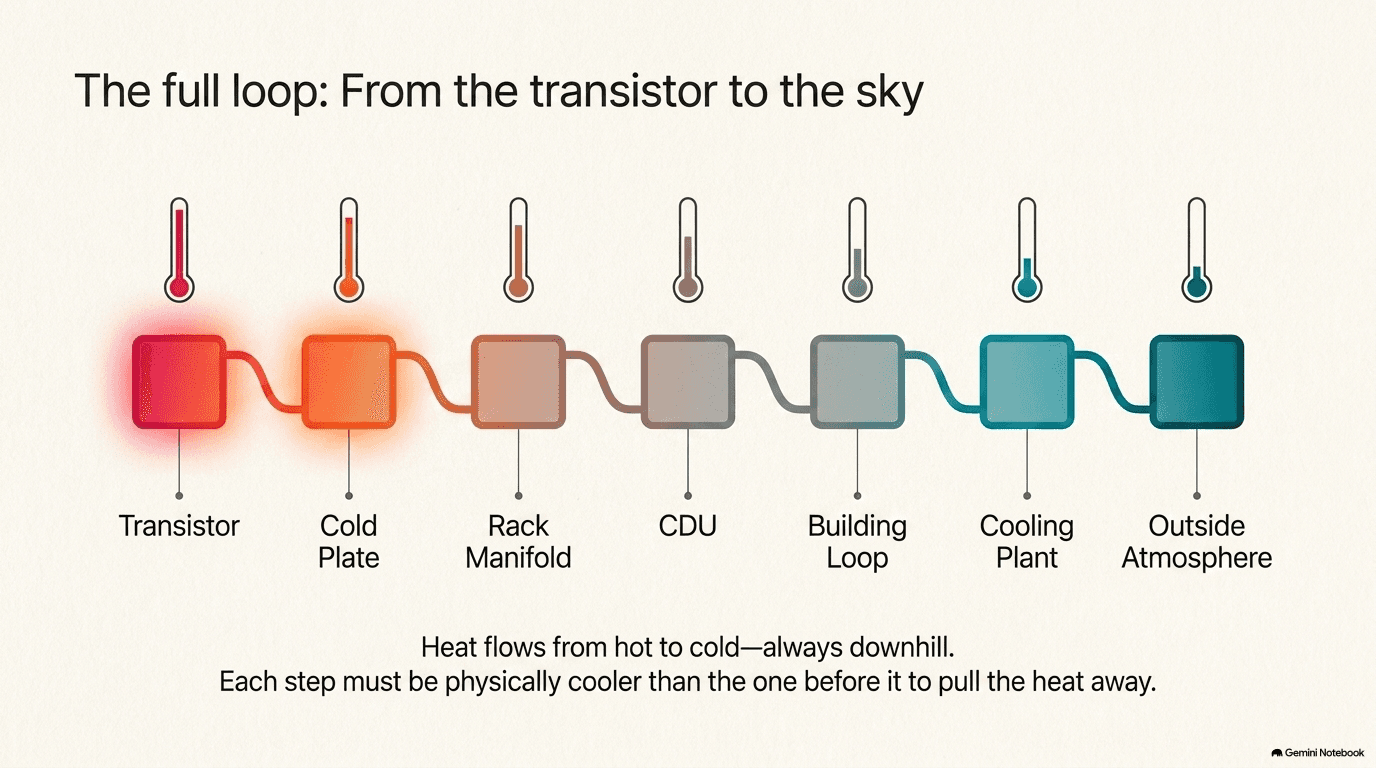
The heat begins its life inside a transistor on a GPU (section 5.1), the moment that transistor switches. From there, it moves into a cold plate bolted directly onto the chip (section 5.3), picked up by coolant flowing through microscopic channels engineered to be in contact with as much of the chip's hot surface as possible. That coolant carries the heat out through the rack's manifold — the plumbing that distributes coolant to every server in the rack and collects it again — and into the CDU, the pump-and-heat-exchanger unit that acts as the heart of the loop, described in section 5.3. Inside the CDU, the heat is transferred from the rack-side loop into a second loop that runs to the building's central cooling plant. At the cooling plant (section 5.4), that heat finally leaves the loop entirely, rejected to the outside world by whichever combination of chillers, dry coolers, or cooling towers the facility has been designed around — and if it's a cooling tower doing the work, the very last step of the journey is water evaporating into the atmosphere (section 5.5), carrying the heat away as vapor.
Every single link in that chain obeys the same basic rule of physics, one worth stating plainly because it explains why the chain has to work in this particular order and can't be shortcut: heat only moves on its own from something hotter to something cooler, never the other way around, unless energy is actively spent to force it (which is exactly what a chiller does, described in section 5.4, at the cost of the electricity it consumes). This is the same principle — formally known as the Second Law of Thermodynamics — that explains why a cup of hot coffee left on a counter cools down to room temperature and never spontaneously heats itself back up. Applied to a data center, it means every stage in the cooling chain has to be slightly cooler than the stage before it — the coolant in the cold plate has to be cooler than the chip, the building loop has to be cooler than the rack loop, the outside air (or the water evaporating into it) has to be cooler than the building loop — for heat to keep flowing forward, one step at a time, all the way out.
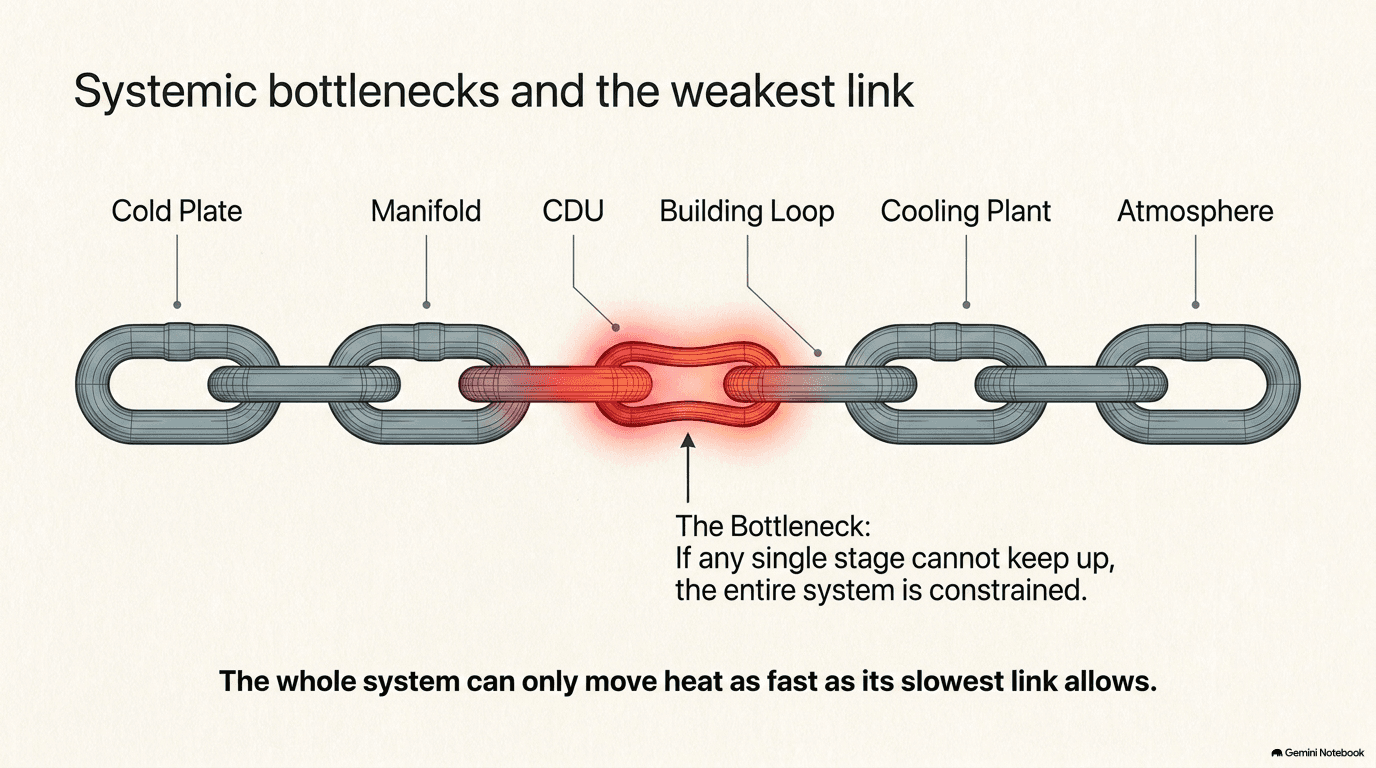
That chain-like structure has a consequence that's easy to miss but genuinely important: the entire system can only move heat as fast as its weakest link allows. A facility can install the most advanced cold plates on the market, engineered to pull heat off a chip with perfect efficiency, but if the CDU serving those cold plates can't move coolant fast enough, or if the building's cooling plant can't reject heat to the outside world quickly enough, the whole chain backs up — heat accumulates somewhere in the middle, temperatures climb, and eventually the chips at the very start of the chain have to throttle themselves down to avoid damage, regardless of how good the cooling technology sitting directly on top of them is. This is why cooling has to be engineered as one integrated system, from chip to sky, rather than as five separate purchasing decisions bolted together — a lesson the industry has learned the hard way as chip power has climbed faster than any single link in the traditional cooling chain was originally built to handle.
That's the deeper reason cooling occupies the position it does in this encyclopedia's story of the AI buildout. Chip designers (Chapter 1) can keep pushing performance higher, generation after generation. But performance and heat are the same coin, viewed from two sides — you cannot meaningfully increase one without increasing the other, given how transistors fundamentally work. A chip that can't be kept cool enough isn't actually faster in any way that matters; it's a chip that will spend a large share of its operating life deliberately running below its own potential, or one that risks damaging itself trying not to. Cooling isn't a supporting act to the chip story told in earlier chapters — it's the thing that determines how much of that chip story the real world actually gets to use. And as the next chapter shows, cooling shares that exact same role with the other great physical constraint running through this entire buildout — power — because carrying heat out of a building takes electricity of its own, tying the story told in this chapter directly into the one told in Chapter 6.
Next: Chapter 6 — Power Inside (the conversions that carry electricity from the building's utility connection down to a single chip)
Companies in this part of the buildout: Cooling