Chapter 3
The Network
A finished AI server is powerful on its own, but training and running today's largest AI models takes thousands of them wired together so tightly and so fast that they behave like a single machine — and the wiring that makes that possible, from the metal frame it all sits in down to beams of laser light, is its own enormous engineering effort.
What Is a Rack?
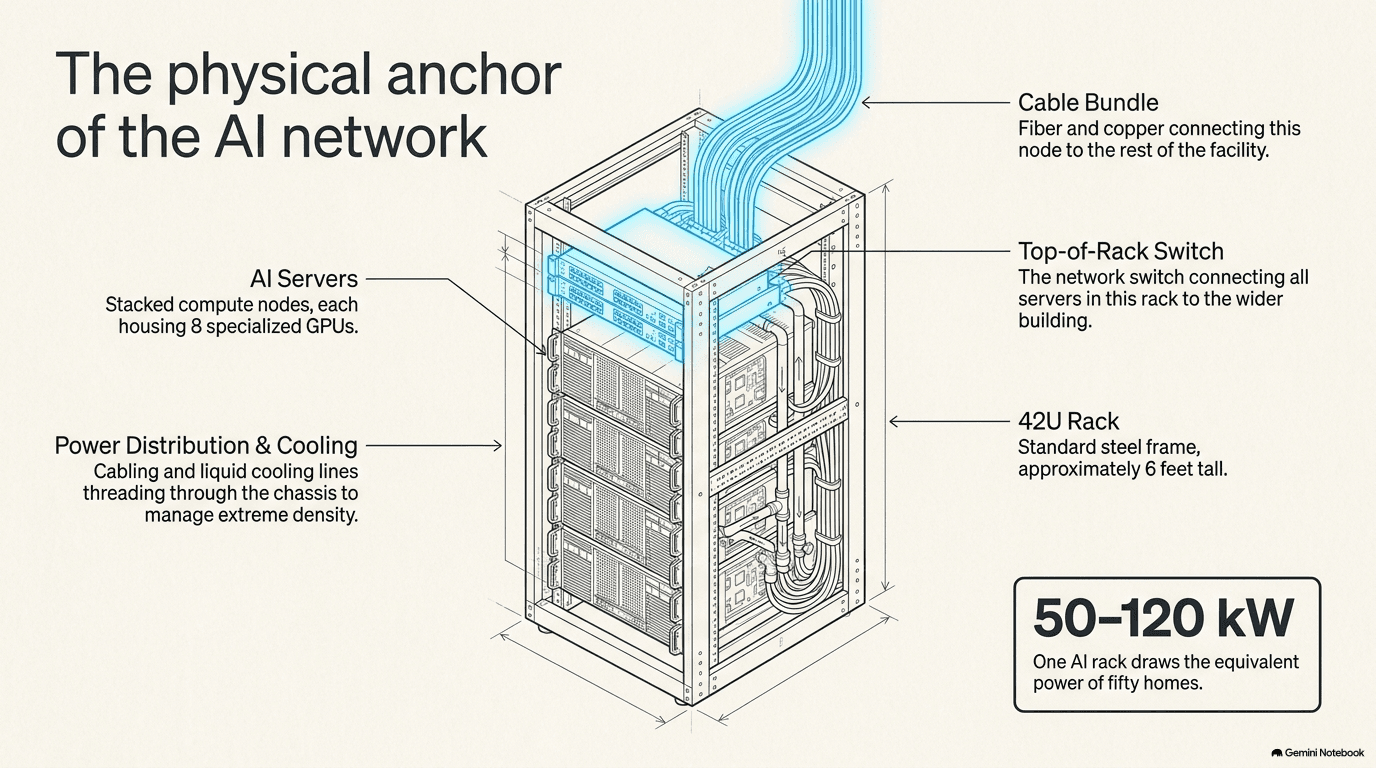
Chapter 2 ended with a finished server: a metal box packed with chips, memory, and storage, ready to compute. But a single server never works alone. Walk into an AI data center and the first thing you notice isn't a server — it's a rack: a tall metal frame, about as wide as a doorway and roughly as tall as a refrigerator, with servers, switches, and cabling bolted into it one above another, like books stacked on a shelf.
Rack space is measured in a unit called "U" — one U is 1.75 inches, roughly the height of a thick paperback lying flat. A standard rack is 42U tall, so it can hold dozens of thin servers, or fewer of the thick, heavily equipped AI servers described in Chapter 2, stacked from floor to ceiling.
What has changed with AI is how much power and heat a single rack now has to carry. An ordinary rack of everyday servers — the kind that run a company's email or website — draws somewhere between 5 and 10 kilowatts, roughly what a couple of homes use. A dense AI rack now draws 50 to 120 kilowatts — as much electricity as fifty homes, squeezed into one frame the size of a large closet. That is the number to hold onto for the rest of this book: it's why cooling an AI data center is a fundamentally harder problem than cooling an ordinary one (Chapter 5), and why the power has to be delivered differently once it reaches the rack (Chapter 6). Everything a rack needs — power, cooling, and the network this chapter is about — connects at exactly this point, which is why the rack, not the server, is really the basic building block of an AI data center.
Racks themselves don't sit alone, either. Walk further into the hall and you'll see them lined up in long rows, usually arranged back-to-back or front-to-front so that the hot air blowing out of one row of servers doesn't blow straight into the intake of the next — a layout called hot-aisle/cold-aisle containment, which shows up again in the cooling chapter. A cluster of racks working together on the same job is sometimes called a "pod." From the outside, a pod looks like nothing more than a row of tall metal cabinets with a wall of cables running along the top or up through the floor. What's actually happening inside is the subject of the rest of this chapter: those cables are the nervous system connecting every rack in the pod, every pod in the hall, and — eventually — every hall in the building.
Near the top of many racks sits a switch dedicated just to that rack — often called a "top-of-rack" switch, because that's literally where it lives. Every server below it plugs upward into this one switch, which then has a small number of thick cable bundles running out to the rest of the network. It's the first stop any piece of data takes on its way out of the rack, and it's the bottom rung of the ladder this chapter climbs — from one rack, to a row of racks, to a whole building, to buildings hundreds of miles apart.
Because a failed server or a failed cable in a densely packed rack has to be found and swapped quickly, without shutting down the neighbors around it, well-run data centers also design for easy serviceability: cables routed and labeled so a technician can trace one without disturbing a hundred others (a discipline explored further in section 3.5), and — in the liquid-cooled racks that Chapter 5 describes — cooling connectors designed to seal themselves shut automatically the instant a hose is disconnected, so pulling one server for repair doesn't spill coolant onto its neighbors. None of that is glamorous, but at the density AI racks now run, a small mistake made while servicing one rack can easily become an expensive problem for the rack next to it.
Why Thousands of Servers Need to Act as One
Here is the idea that this whole chapter exists to explain. Training a large AI model isn't something one server does by itself, however powerful it is. It's a job split across thousands of GPUs — the parallel-processing chips from Chapter 1 — all working on the same problem at the same moment, constantly comparing notes and sharing partial results as they go.
That last part is the whole trick, and the whole difficulty. Picture a thousand people each solving one small piece of a giant math problem, but every few seconds they all have to stop, shout their partial answer to everyone else in the room, and only then continue. If even one person is slow to shout, everyone else stands there waiting. Multiply that by thousands of GPUs finishing their piece of work in a fraction of a second and needing to exchange results just as fast, over and over, for days or weeks at a time. If any single GPU has to wait for data, every other GPU in the job sits idle too — burning electricity and time for nothing. The network isn't a convenience wired in around the computing. It's the thing that turns a room full of separate chips into one enormous computer.
What, concretely, are they exchanging? Training an AI model, as Chapter 1 described, means repeatedly adjusting billions of internal values so the model gets a little better at its task. Each GPU works through its own slice of the training data and computes its own suggested adjustments. But those suggestions are only useful in combination — the model needs the average adjustment across every GPU working on the job, not thousands of GPUs each quietly nudging the model in a slightly different direction. So after every round of computing, all the GPUs have to combine their individual suggestions into one shared answer, and then every GPU needs a copy of that combined answer before it can start the next round. This combine-and-share step, repeated tens of thousands of times over the course of a single training run, is the "shouting" moment made concrete, and it is almost entirely a networking problem, not a computing one.
This also explains why a single slow or misbehaving GPU is such an outsized problem, in a way that's worth naming directly: engineers call a chip that's lagging behind the rest of the group a straggler, and because every other GPU in that round is waiting on the combined answer, one straggler can slow down an entire job of thousands of chips just as effectively as a widespread failure would. A network that occasionally delivers data a little late, or a switch that occasionally has to retransmit a dropped piece of data, creates exactly this kind of straggler — which is one more reason the testing described in section 3.6 isn't a minor afterthought. A network fast enough on average but unreliable in its worst moments can be worse for training speed than a network that's simply a little slower but consistent.
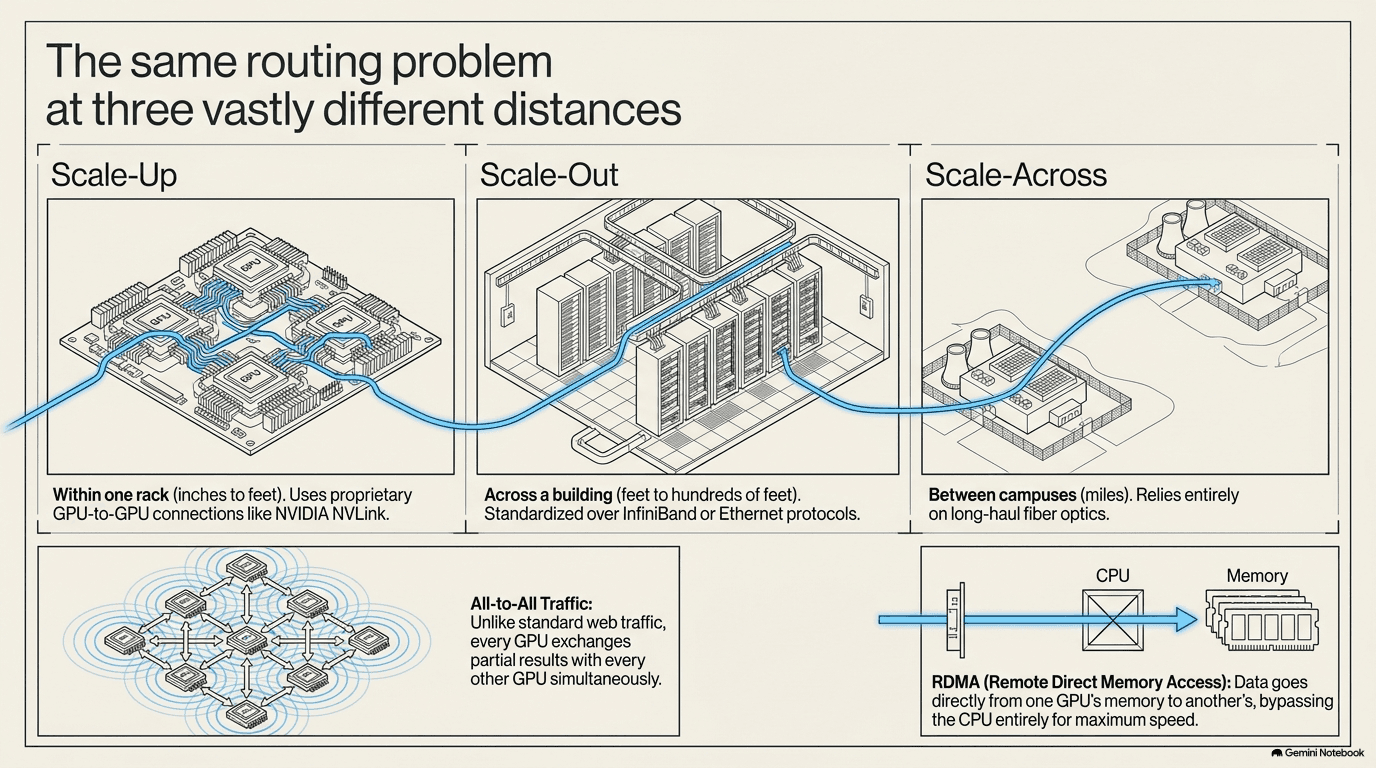
That wiring happens at three distinct scales, and it's worth holding them apart, because different technologies handle each one:
- Scale-up — the connections inside a single rack, chip to chip, between GPUs sitting inches apart. These are the shortest hops, but also the fastest and most demanding, because the data has to move with almost no delay at all.
- Scale-out — the connections within a data center, tying many racks together into one cluster, often spanning a whole building.
- Scale-across — the connections between data centers, sometimes hundreds of miles apart, so that multiple buildings can work on the same training job together.
There's a second reason ordinary office networking isn't good enough here, beyond raw speed. On a normal computer network, when one machine wants to send data to another, the message typically has to pass through both machines' central processors along the way — the CPU has to notice the incoming data, copy it into memory, and hand it off, adding a small delay at every step. AI training can't afford that delay repeated billions of times. So AI networks lean heavily on a technique called RDMA — remote direct memory access — which lets one GPU write data directly into another GPU's memory, on a different server entirely, without either CPU having to get involved in moving it. It's the difference between mailing a letter through your building's front-desk clerk, who logs it and walks it upstairs, and simply passing it directly through a hole in the wall into your neighbor's hand. Over the millions of exchanges a single training run requires, skipping that clerk adds up to an enormous amount of saved time.
For years, the fastest of these networks ran on a specialized technology called InfiniBand — purpose-built from the ground up for exactly this kind of tightly coordinated, low-delay, RDMA-heavy traffic, and long the standard in supercomputing, but expensive, proprietary, and unfamiliar to most ordinary data-center engineers. Increasingly, the industry is moving toward a souped-up version of ordinary Ethernet — the same general family of networking that carries most of the everyday internet, extended with its own RDMA capability — because Ethernet is cheaper, built on open standards that many companies can supply competing equipment for, familiar to the much larger pool of engineers who already run ordinary data centers, and has finally gotten fast enough to keep up. Some of the largest AI operators have already made this switch at full production scale. Neither technology has won outright; both are in wide use today, and which one a given data center chooses shapes almost everything else described in this chapter, from which switch chips it can use to how the cabling underneath is designed.
The Switch — Traffic Cop of the Network
If thousands of chips need to exchange data constantly, something has to make sure each piece of data actually reaches the right destination without colliding with everything else trying to move at the same instant. That job belongs to the switch — a piece of equipment whose only purpose is to receive data arriving from one connection and immediately send it out the correct other connection, the way a busy highway interchange sorts traffic onto the right roads without cars crashing into each other.
Ordinary computer networks already use switches. What makes an AI network's traffic pattern so much harder is a specific behavior called all-to-all communication: at various points during training, every single GPU needs to send data to every other GPU, all at roughly the same time. It's the "shouting" moment from the previous section, playing out across the wiring. A switch has to move all of that traffic through without any one path becoming a bottleneck that leaves other GPUs waiting.
To see why this is so demanding, imagine an office of a hundred people who each need to hand a document to all ninety-nine others, at the same moment, through a single mail room. If the mail room has only one clerk and one desk, the line backs up instantly, and everyone waits regardless of how fast any one handoff is. An AI network switch has to behave like a mail room with enough parallel paths, wide enough doors, and fast enough clerks that a hundred thousand simultaneous handoffs all clear in a fraction of a second, without any single path becoming the one everyone is stuck behind. Engineers call this kind of pileup congestion, and a large part of what makes a good AI switch good is how gracefully it manages congestion when the network is momentarily asked to do more than it can instantly handle — spreading traffic across multiple paths, and briefly holding data rather than dropping it, so that no single lost or delayed piece forces the whole synchronized exchange to restart.
Inside every switch sits a custom chip — a switch ASIC (an application-specific integrated circuit: a chip designed to do exactly one job, and nothing else) — that actually performs the routing, deciding in real time which incoming data goes out which connection. This is one of the quieter chokepoints in the entire buildout. Most of the industry's switch chips come from a single company, Broadcom (AVGO), whose current-generation chip can move data at roughly 100 terabits per second — enough, in theory, to move the contents of a very large public library every second — with a successor chip moving twice that speed already in development. Because this one company's chip design sits at the center of so many switches across the industry, its supply effectively gates how fast a large part of the whole network can grow.
The companies that build the actual switch boxes — the metal units that plug into the rack, with the switch ASIC inside — sit one layer up from the chip itself. Arista (ANET) is one of the leading builders of the switches deployed in AI data centers, and buys its routing chips from Broadcom rather than designing its own. Cisco (CSCO) takes the opposite approach, designing its own switch silicon in-house, which it argues protects it from relying on any single outside chip supplier. And Marvell (MRVL) occupies a different niche entirely, designing custom switch and networking chips specifically for the largest cloud operators, who sometimes want a chip built to their own exact requirements rather than a general-purpose one.
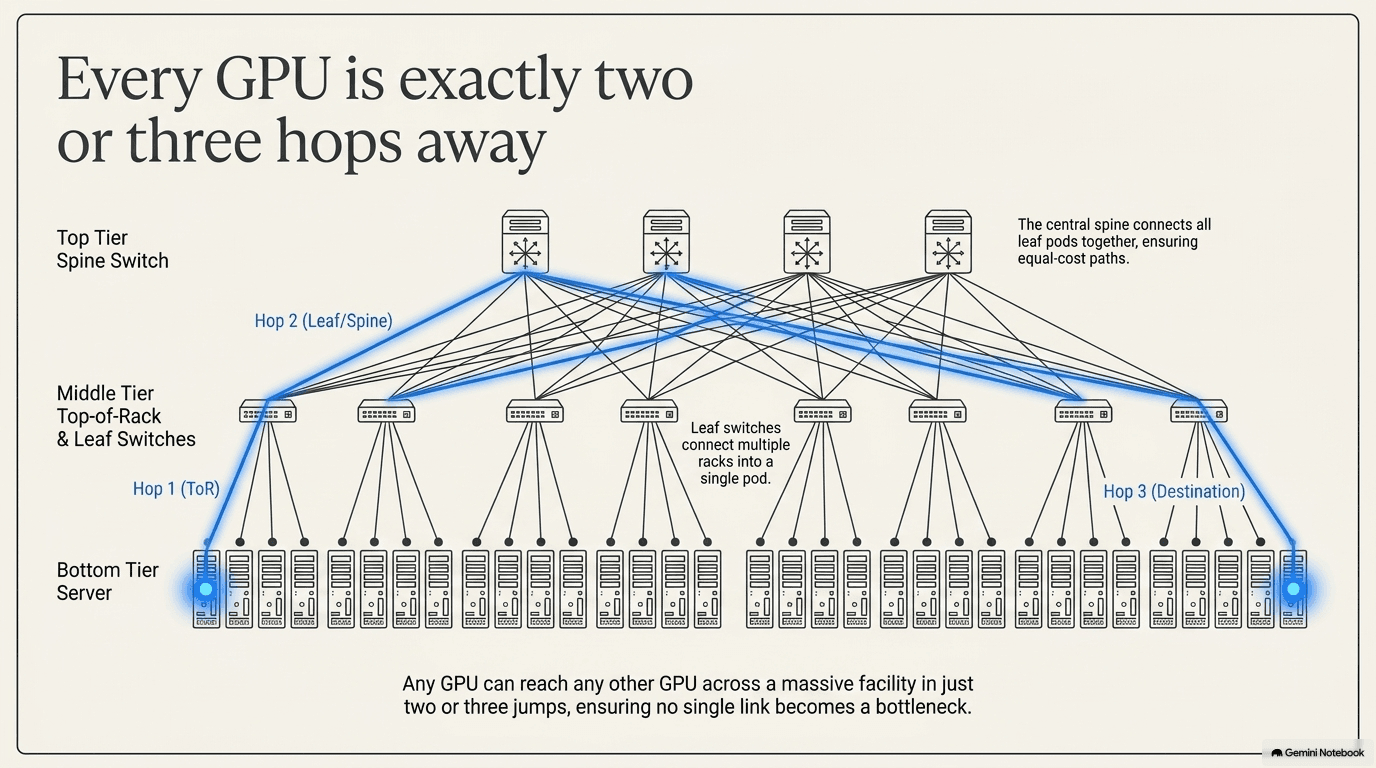
Zoom out from any single switch, and the way an entire data center's switches are arranged has a name: leaf-spine topology. Picture it as two tiers. "Leaf" switches sit closest to the servers — every rack connects up to one. "Spine" switches sit above them, connecting the leaf switches to each other. Because every leaf switch connects to every spine switch, data traveling from any one server to any other server anywhere in the building only has to pass through two or three switches — two or three "hops" — no matter how far apart the two racks physically are. That's the structural trick that lets a building-sized cluster behave, from the network's point of view, almost as if every GPU were sitting right next to every other one.
This two-tier design replaced an older style of network, sometimes pictured as a tree, where traffic climbed up through a small number of switches at the very top before coming back down — a structure that worked fine for ordinary office traffic (mostly flowing up to the internet and back) but chokes badly under all-to-all traffic, because everything is forced through the same handful of switches at the top of the tree at once. Leaf-spine spreads the load across many parallel spine switches instead of a single top layer, so there isn't one obvious place for traffic to pile up. As a cluster grows from a few racks to thousands, more spine switches are simply added in parallel — the topology scales by getting wider, not by adding more layers on top, which is part of why hop count can stay at two or three even as the building gets much larger.
How wide a network can spread, and how few layers it needs, comes down to a number engineers call a switch's radix — simply how many separate connections, or ports, a single switch chip has. A higher-radix chip can connect to more leaf switches directly from each spine switch, which means a single layer of spine switches can cover a bigger cluster before a second layer becomes necessary. This is one more reason the switch ASIC discussed above matters so much beyond raw speed: a chip that packs in more ports doesn't just move data faster, it lets the entire building's network stay flatter and simpler as the cluster grows.
A last set of specialists handles the very shortest, hardest links of all — the scale-up connections inside a single rack, where the distance is measured in inches but the speed has to be the highest in the whole system, because GPUs sitting a few inches apart still need to move data even faster than the leaf-spine network described above. These companies make the high-speed cables and the small chips that clean up and re-amplify a signal so it survives that short but demanding hop, plus the connectivity chips that let a GPU, its memory, and its neighbors on the rack all talk to each other at full speed, often over a dedicated scale-up fabric that never leaves the rack at all. This is a genuinely different engineering problem from the longer scale-out and scale-across links covered in the rest of this chapter: over inches, a signal can be pushed harder and cleaner than it can over meters, but there is zero tolerance for delay, because these are the connections training leans on hardest and most constantly.
From Electricity to Light — Optical Transceivers
There's a hard physical wall standing in the way of scale-out and scale-across networking, and it has nothing to do with chip design. At the speeds AI networking now runs — 400, 800, and increasingly 1,600 gigabits of data per second — an electrical signal traveling down an ordinary copper wire simply fades out after a few meters. Push it further than that and the signal degrades until it's unreadable, the way a shout becomes an unintelligible mumble after enough distance. Copper is fine for the shortest connections. Beyond a few meters, at AI speeds, it stops working at all.
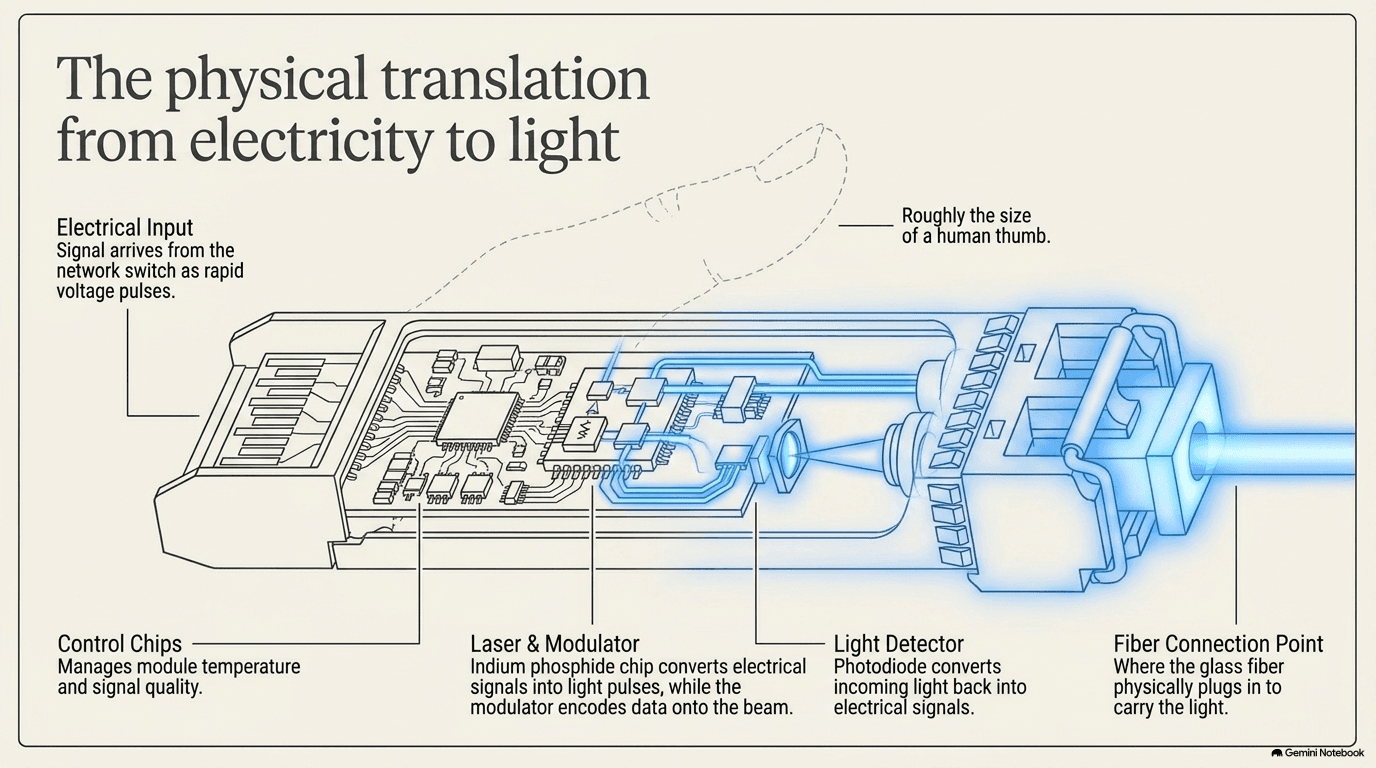
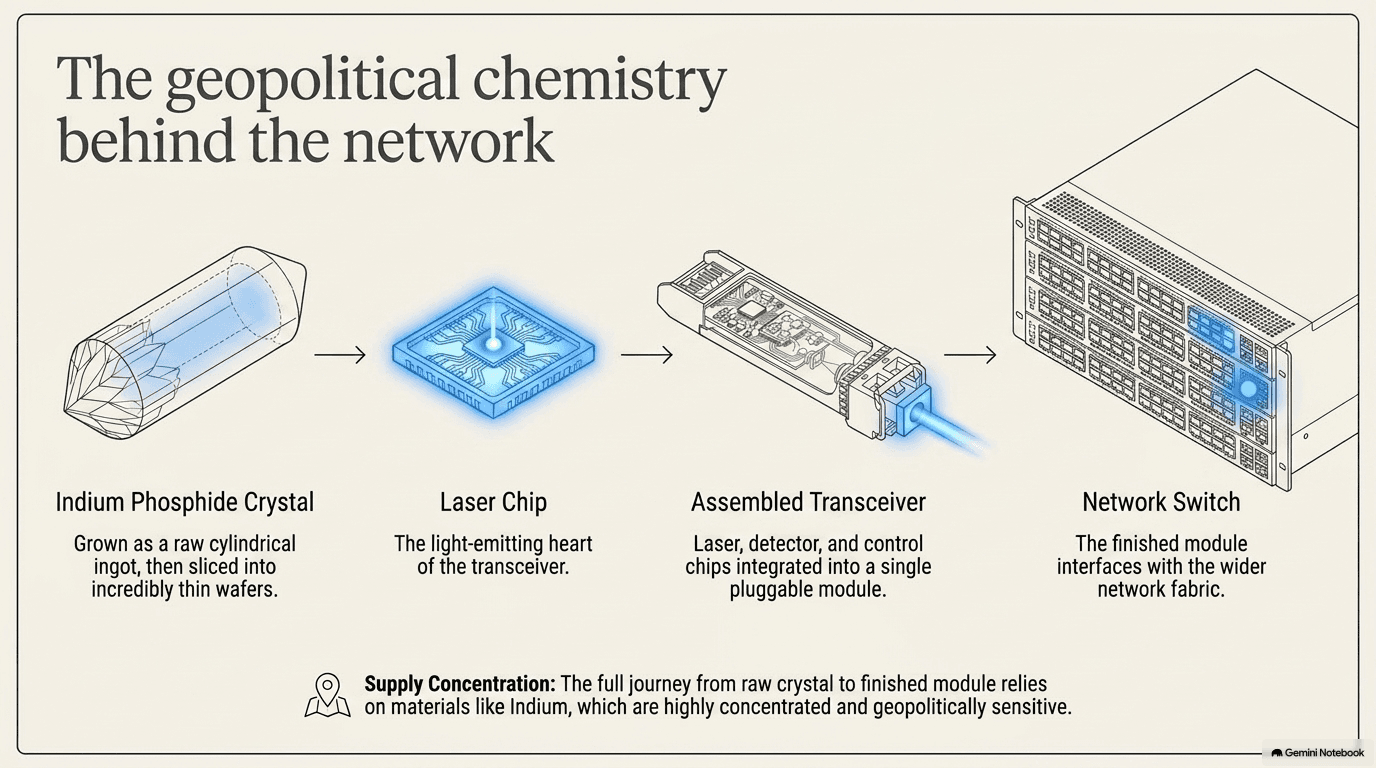
The way around this physical limit is to stop sending electricity and start sending light instead. Light traveling down a strand of glass barely fades at all, even over long distances, because it isn't fighting electrical resistance the way current in a wire is. The device that makes this conversion is called an optical transceiver: a module roughly the size of your thumb that plugs into a switch or a server. On the way out, it takes the electrical signal, uses a tiny laser to convert it into rapid pulses of light, and fires those pulses down a glass fiber. On the way in, it does the reverse — a detector catches the incoming light pulses and turns them back into an electrical signal the chip can read. Inside that thumb-sized module sits the laser itself, a modulator (which flickers the laser rapidly on and off to encode the data as light pulses, essentially a very fast, very precise signal light), the light detector for incoming signals, and a small chip that keeps the whole thing timed correctly and reshapes the signal so it stays clean at these speeds. The industry moves through speed generations that roughly double every few years — 400G, then 800G, now 1.6 terabits (1,600 gigabits) per second — and each jump demands a faster, more precisely engineered version of this same small module.
One more trick lets a single fiber carry far more than one signal at once: instead of sending a single color of light down the glass, a technique called wavelength division multiplexing (WDM) sends multiple separate signals down the same strand at the same time, each riding on its own slightly different color, or wavelength, of light. It's the optical version of several radio stations sharing the airwaves without interfering with each other, because each is tuned to its own frequency; a detector at the far end simply separates the colors back out again. WDM is one of the main reasons a single fiber optic strand can carry so much more data than a single copper wire ever could — the physical strand doesn't get faster, it just gets asked to carry many independent conversations in parallel.
The hardest part of a transceiver to build is the laser, and it usually isn't made from ordinary silicon at all. It's made from an exotic crystal material called indium phosphide, which is far better than silicon at directly emitting light — a property silicon essentially lacks. This is a case where a raw-material chokepoint quietly sits underneath a huge piece of the AI buildout. AXT (AXTI) is one of the leading makers of the indium phosphide wafers that these laser chips are cut from — and all of its manufacturing happens in China, which means every wafer it sells outside China requires an export permit from the Chinese government. A supply chain that starts with a rare crystal grown in one country and ends inside a thumb-sized optical module is a preview of a pattern this book returns to repeatedly: for a huge fraction of AI hardware, the true chokepoint isn't the finished product, it's an obscure material a few steps upstream of it, sometimes tied to a single country's export rules — the full story of these materials, and where in the world they actually come from, is Chapter 10.
Building the finished transceivers around these lasers is its own specialized industry. Coherent (COHR) and Lumentum (LITE) both design and manufacture the lasers and the finished optical modules themselves. Fabrinet (FN) operates as a contract manufacturer, assembling many of these delicate modules at scale on behalf of others, since a transceiver has to be built with a level of precision closer to a surgical instrument than an ordinary circuit board. Applied Optoelectronics (AAOI) takes a different path, making its own lasers in-house rather than buying them from anyone else, trading some flexibility for tighter control over its own supply. Demand for all of this has grown so large, and the supply of the underlying lasers so tight, that NVIDIA (NVDA) — the largest buyer of the chips these transceivers connect — took direct financial stakes of roughly $2 billion each in Coherent and Lumentum, tied to multi-year supply agreements. That is not how components normally get bought. It's what happens when a customer needs to lock in a scarce, highly specialized part years in advance, rather than simply ordering more of it when needed.
These modules aren't a minor footnote in the power and heat picture, either — each one draws real power and generates real heat of its own, multiplied by the sheer number wired into a large cluster, which is part of why the cooling and power chapters later in this book (5 and 6) treat networking gear, not just GPUs, as something that needs active cooling too.
There's also a middle option, used for the shortest optical-ish hops, that's worth knowing the name of: a direct-attach copper (DAC) cable is simply a copper cable with a transceiver-style connector built onto each end, used for connections within or between adjacent racks where the distance is too short to justify the expense of going optical at all. Step up slightly in distance and you find active optical cables (AOCs) — a fixed length of fiber with the laser and detector permanently built into each end, cheaper than a full pluggable transceiver-plus-separate-fiber setup but not reconfigurable the way a transceiver-and-patch-cable combination is. Data centers mix all three — DAC, AOC, and pluggable transceivers with separate fiber — choosing whichever is cheapest for a given distance and speed.
A more mundane constraint also shapes this whole layer: the front panel of a switch is only so wide, and each transceiver needs its own small slot to plug into. As speeds climb and clusters grow, engineers run into what's sometimes called a faceplate density problem — simply not having enough physical space on the front of the switch for as many transceivers as the network design calls for. That's one more reason co-packaged optics — the coming shift covered next — is attractive: it doesn't just shorten the electrical path, it also frees up the faceplate by moving the optics off it entirely.
One more shift is worth flagging here, because it points toward where this whole layer of the industry is heading. Today, the optical transceiver is a separate module that plugs into the switch from the outside. An emerging approach called co-packaged optics moves the optical components — the lasers, the modulators, the detectors — directly onto the same package as the switch chip itself, shrinking the electrical distance the signal has to travel before it becomes light. It's still early, and it changes how switches, transceivers, and the manufacturers who assemble them all have to work together, but it's the direction the industry is moving as speeds keep climbing and every extra millimeter of electrical wire — and every extra transceiver slot on a crowded faceplate — becomes a liability.
Cables, Fiber, and Connectors
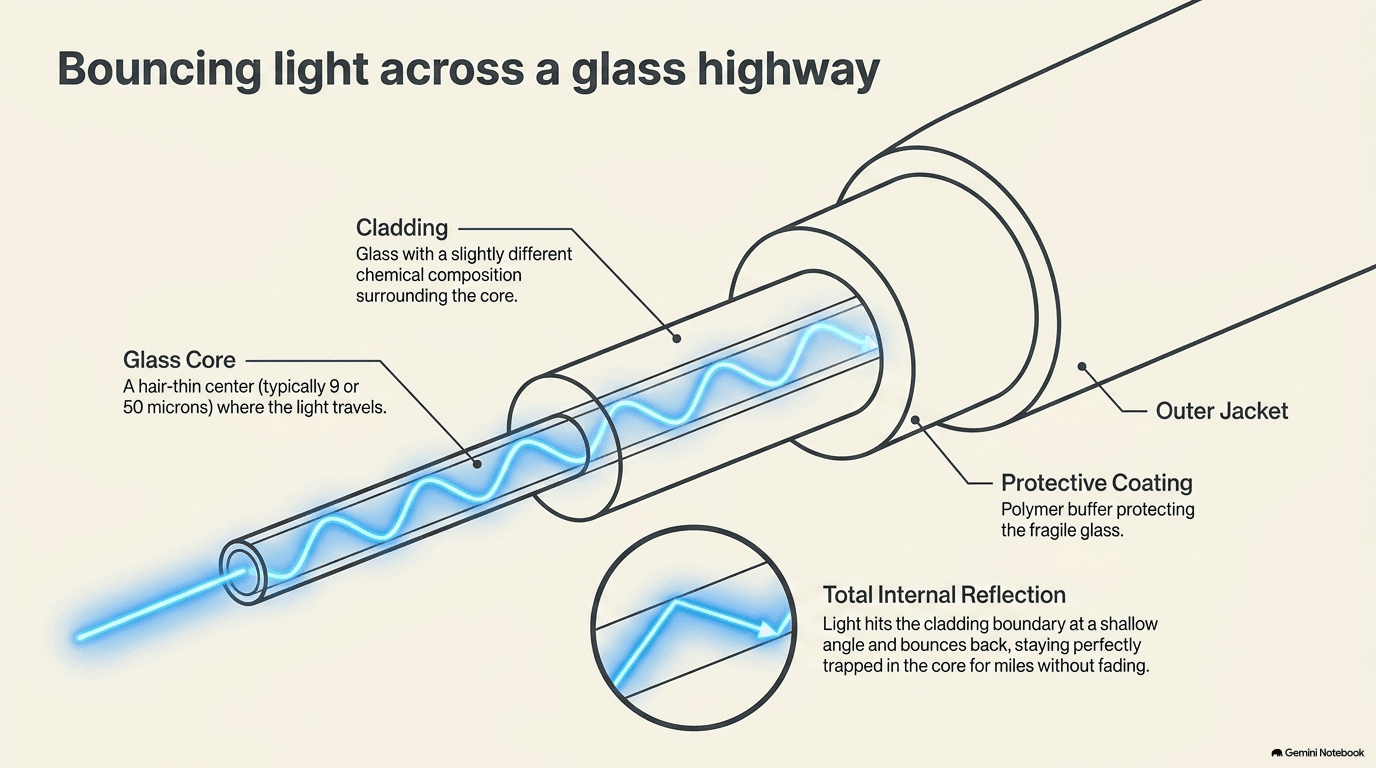
The light coming out of a transceiver has to travel through something, and that something is fiber optic cable — strands of glass so pure and so thin, thinner than a single human hair, that light can bounce down the length of one for miles and barely lose any brightness. The trick that makes this work is a simple piece of physics called total internal reflection: light hitting the boundary between the glass core and the material wrapping around it, at a shallow enough angle, bounces back inward instead of escaping, over and over, all the way down the strand — like a ball perfectly bouncing down the inside of a long, curved tube without ever hitting the outer wall.
Not every connection in a data center uses fiber, though. For the very shortest hops — inside a rack, or between two racks sitting right next to each other — plain copper cable is still common, because for a short enough distance copper doesn't hit the fading problem described in the last section, and it's considerably cheaper to make and install. The rule of thumb across the whole network is simple: the shorter the distance, the more likely it's still copper; the longer the distance, the more it has to be light.
Fiber itself comes in two main flavors, and the difference is really about how narrow the glass core is. Single-mode fiber has a core so narrow that light can only travel down it in essentially one straight path, which keeps the signal sharp over very long distances — this is what carries traffic across a data center hall or between buildings. Multi-mode fiber has a slightly wider core that lets light bounce down it along several slightly different paths at once; those paths blur together over long distances but are cheap and perfectly fine over the shorter runs common inside a single data-center room. Choosing between them is a straightforward trade of cost against distance, and a large data center typically uses both, matched to the length of run each cable has to make.
And there is simply an enormous amount of it. A single AI cluster can require hundreds of thousands of individual fiber and copper connections, all of which have to be physically routed — bundled into trays, run overhead or under a raised floor, labeled, and kept untangled — without blocking the airflow that the cooling system depends on. This unglamorous discipline, sometimes called structured cabling, is easy to overlook next to the chips and switches it connects, but a data center with disorganized cabling is one where a single technician tracing a fault can lose hours, and where replacing one bad cable risks disturbing a hundred others packed in beside it.
The glass fiber itself is a specialized manufacturing product in its own right, made by only a handful of companies capable of producing it with the purity and consistency AI networking demands. Corning (GLW), a company that has been making specialty glass for over a century, is the dominant maker of this optical fiber, and has signed supply agreements worth billions of dollars with several of the largest cloud computing companies as they race to wire their new data centers together. Wherever a fiber cable or a copper cable actually meets a piece of equipment, it needs a connector — a precisely machined plug and socket, built to make and hold an exact physical and electrical connection without letting any signal leak or degrade at the joint. Amphenol (APH) and TE Connectivity (TEL) are the two largest connector manufacturers supplying this layer, and their AI-related business has grown sharply as the sheer amount of cabling inside a data center has climbed.
The theme worth carrying forward is that this isn't a competition where optical replaces copper and copper disappears. It's copper and optical, each doing the job it's best suited for, and the total amount of both keeps climbing as data centers grow larger and the distances between racks, rows, and buildings stretch further. Every additional connection point in this section — every meter of fiber, every connector — is also, physically, another thing that has to be manufactured to an exacting standard and tested before it's trusted, which is the subject of the next section.
One scope note before moving on: everything in this section lives inside one building or campus — the wiring between racks, rows, and halls. The scale-across connections between separate data centers, sometimes running along entirely different fiber routes strung across cities, countries, or under the ocean, are a bigger and different infrastructure problem, and Chapter 8 picks that thread up.
Testing the Network
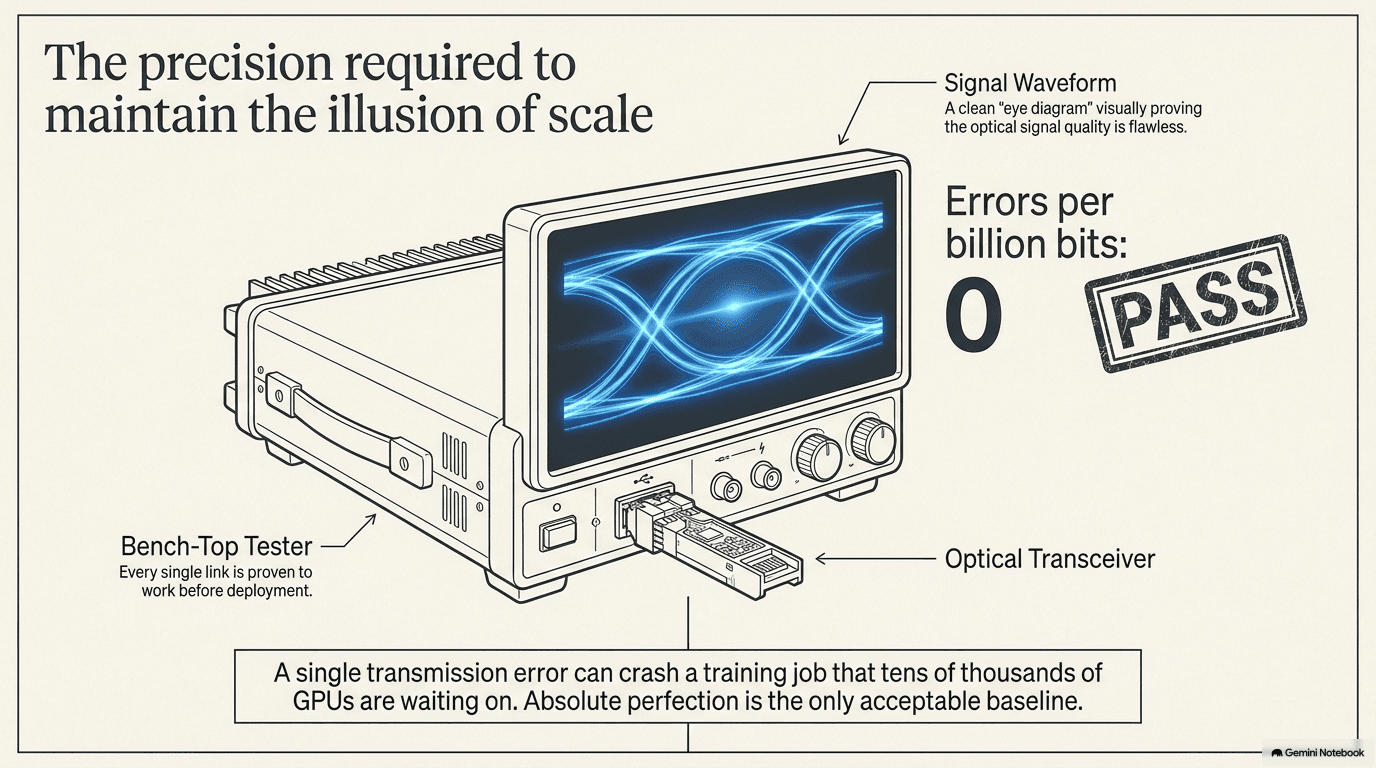
Every switch, every transceiver, every cable, and every connector described in this chapter has to be tested before it's trusted inside a live network — proven to move data at full speed with an almost immeasurably small error rate. The reason this matters so much in AI networking specifically, more than in an ordinary office network, comes straight back to section 3.2: because thousands of GPUs are working in tight lockstep, a single weak link anywhere in the chain doesn't just slow down its own small corner of the network. It can stall the entire training job, because every other GPU is waiting on the same synchronized exchange of data.
This testing happens with specialized equipment built specifically to push a link to its absolute limit and measure exactly how it behaves — checking things like the bit error rate (how often a 1 gets misread as a 0, or vice versa, out of billions of bits sent per second) and general signal integrity (whether the electrical or optical signal still looks clean and correctly shaped after traveling through the cable, the connector, and the transceiver). One common way engineers visualize this is something called an eye diagram — a chart that overlays thousands of individual signal pulses on top of each other, so any distortion, noise, or timing wobble shows up as a smudge closing in on the clean, wide-open "eye" shape a perfect signal would trace. A wide-open eye means the signal has plenty of margin for error; a nearly-closed eye is a warning that a link is on the edge of failing under real conditions. Test equipment also runs new components through burn-in — extended operation under realistic or stressed conditions — to catch any part that is likely to fail early, before it's ever installed where a failure would take down thousands of GPUs at once rather than one component on a test bench.
Keysight (KEYS), the largest test-and-measurement company, supplies much of this equipment across the industry. Viavi (VIAV) focuses more specifically on testing and monitoring fiber connections once they're installed and carrying live traffic.
Testing isn't only about whether one component works in isolation, either. Because a real network mixes switches, transceivers, and cables from more than one manufacturer, equipment also has to pass interoperability testing — proving that Company A's switch and Company B's transceiver and Company C's cable all actually work correctly together, at full speed, not just each in its own lab. A component that passes every test on its own maker's bench but doesn't play well with someone else's equipment is just as much of a problem as one that fails outright, which is why so much of this testing happens in shared, neutral facilities rather than any single vendor's building.
There's a useful pattern hidden in this corner of the industry: because every new networking generation — the jump from 800G to 1.6T, for instance — has to be fully tested before it can ship in volume, the test equipment for a new generation has to exist and work before the switches, transceivers, and cables of that generation reach data centers. That makes the companies who build test equipment an early, quiet signal of what's coming next in the rest of this chapter, months before it shows up anywhere else.
Put the whole chapter together, and the picture is this: a rack full of servers is only as powerful as the network wiring it to every other rack. That network works at three different scales — scale-up inside a rack, scale-out across a building, scale-across between buildings — kept in order by switches built around a small number of routing chip designs, stretched across distance by converting electricity into light inside optical transceivers, carried by fiber and copper and joined by connectors, and proven reliable through testing before it's ever allowed to carry a live job. Every layer of it exists to solve the same underlying problem from section 3.2: thousands of GPUs computing their own small piece of an answer, and needing to combine those pieces into one shared answer, over and over, without any single chip ever being left waiting. None of it makes an AI model smarter on its own. All of it decides whether thousands of separate chips act like a single computer — or like thousands of chips sitting idle, waiting on each other.
Next: Chapter 4 — The Room and the Building (the structure built around the racks)
Companies in this part of the buildout: Networking