Chapter 11
The Software
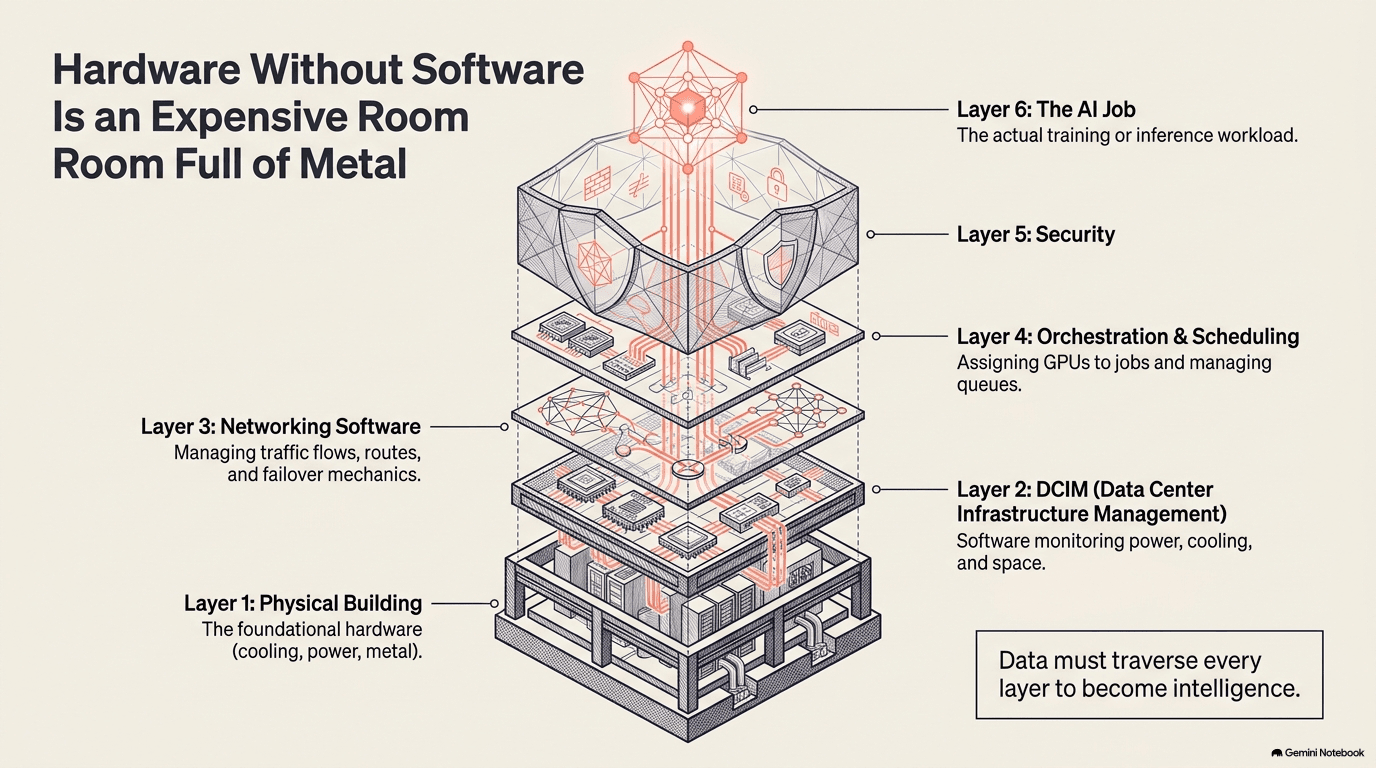
Before a single AI job runs, a hidden layer of software watches the building, schedules the work, programs the network, and defends the whole thing from attack — the invisible nervous system that makes ten chapters of physical infrastructure function as one machine.
The Invisible Layer
Here is a thought experiment. Imagine a data center has been built perfectly: every GPU installed, every switch connected, every transformer energized, every chiller running. Nothing has been turned on yet. What's missing?
The answer is everything that tells the machine what to do. Which of the 100,000 GPUs should run this training job? If one fails at 3 a.m., what happens to the two weeks of computation it was part of? How does the building know that rack 47 is drawing too much power and rack 48 has headroom? Who reconfigures the network when a new cluster comes online? How does anyone know if an attacker is probing the system?
These questions are all answered by software — a stack of programs that sits between the physical infrastructure and the AI workloads, managing the gap. This software is invisible to the end user (the person asking an AI model a question has no idea it exists), largely invisible even to the data-center operator's customers, and often underappreciated relative to the headline hardware. But without it, the hardware is an expensive collection of metal and glass that generates heat and does nothing.
Watching the Building
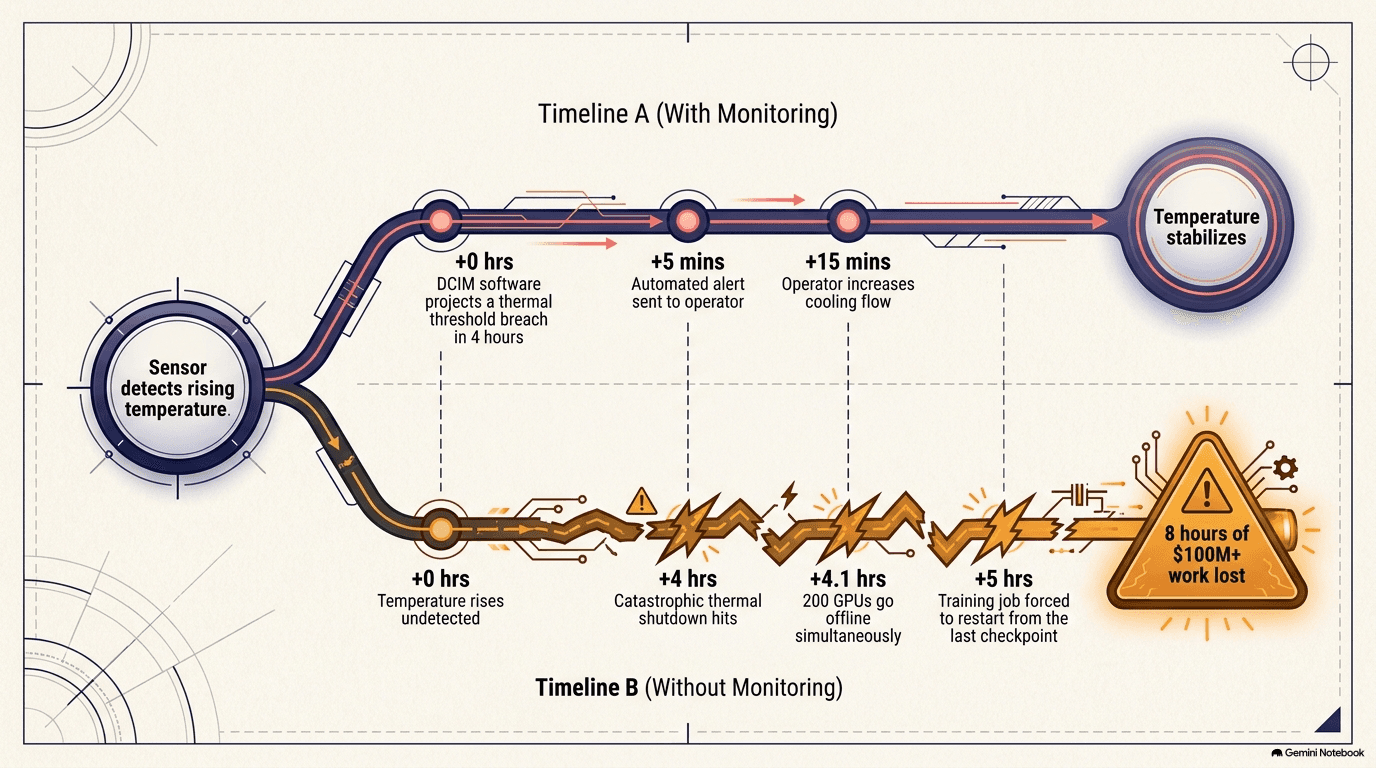
A large data center has thousands of servers, thousands of power circuits, hundreds of cooling units, and tens of thousands of sensors — temperature probes at every rack inlet and outlet, current sensors on every breaker, flow meters on every coolant loop, humidity sensors, leak detectors, fuel-level gauges on the generators, vibration monitors on the chillers. All of these change continuously. Something has to watch all of it at once, spot problems before they cause failures, and tell the operators where there's capacity to add more load. That something is DCIM — Data Center Infrastructure Management — and the broader category of observability tools.
At its simplest, DCIM is a dashboard: a screen (or a set of screens) that shows the real-time state of every system in the building. Power drawn by each rack. Temperature at each inlet. Cooling capacity used and available. Generator fuel level. UPS battery charge. At its most sophisticated, it is a predictive system that uses pattern recognition to anticipate problems before they happen. It notices that the temperature trend on a particular row of racks is climbing faster than the cooling system's capacity to respond, and alerts the operator before anything overheats. It notices that a particular circuit breaker has been tripping more frequently — a sign that a connection is degrading — and flags it for maintenance before it fails entirely. It correlates power draw with outdoor temperature and cooling-system performance to predict capacity limits days in advance.
The sensor density in a modern AI data center is extreme. A single server rack might have temperature sensors at the front inlet, the rear exhaust, the liquid-cooling supply and return lines, the CPU and GPU packages, and the power-supply output. Multiply that by thousands of racks, add the sensors on every cooling unit, every power bus, every generator, every fuel tank, every water line, and the total can reach tens of thousands of data points updating every few seconds. Making this useful — turning a firehose of numbers into actionable information — is the core challenge of DCIM software.
The AI-specific twist is that observability now extends into the compute itself. When a training job is running across thousands of GPUs, the monitoring system tracks not just the physical infrastructure but the GPUs themselves: their temperatures, their power draw, their utilization (how busy they are), and their error rates. A GPU that starts reporting correctable memory errors at an increasing rate may be heading toward failure — catching that early and migrating its workload to a spare GPU can save days of wasted computation. Companies like Datadog (DDOG) build observability platforms that monitor both the infrastructure and the AI workloads running on it. Vertiv (VRT), from the hardware chapters, also offers management software and digital twins of the building. Nutanix (NTNX) provides platform software that runs infrastructure across many machines.
A more advanced concept is the digital twin: a software model of the entire data center that mirrors the real one in real time — fed by the same sensor data, updated continuously, and accurate enough to simulate changes before making them. The digital twin is not a static blueprint; it is a living model that reflects the current state of every system: which racks are occupied, how much power each is drawing, what the airflow patterns look like, where the cooling capacity has headroom and where it's near the limit.
The value of the twin is in "what-if" scenarios. What happens if we add fifty more racks to this hall? Does the cooling system have enough capacity? Will the power distribution handle the additional load? What if we lose a chiller — which racks will overheat first, and how fast? What is the optimal way to distribute a new 20-megawatt training cluster across three halls to minimize cooling stress? The digital twin answers these questions in simulation, which is far cheaper and safer than finding out by actually adding the racks and seeing what breaks. For a facility where a thermal event can destroy millions of dollars of hardware in minutes, the ability to test changes in a model first is not a luxury; it is a basic risk-management tool.
The predictive side of monitoring is becoming increasingly important. Thermal modeling uses the historical relationship between outdoor temperature, internal heat load, and cooling-system performance to predict when the facility will approach capacity limits — not in hours but in days, giving operations teams time to pre-position additional cooling capacity or defer non-critical heat-generating maintenance. Power-quality monitoring watches for subtle electrical anomalies — harmonic distortion, voltage sags, power-factor drift — that can indicate degrading connections, overloaded transformers, or failing UPS modules long before they produce an outage. Predictive maintenance on mechanical systems (pumps, fans, compressors) uses vibration analysis and temperature trending to identify bearings approaching failure: a pump whose vibration signature shifts from one pattern to another may have months of remaining life, but the shift is an early warning that allows scheduled replacement rather than emergency repair at three in the morning during a training run. Each of these capabilities turns the monitoring system from a reactive alarm (something broke, deal with it) into a proactive management tool (something is degrading, fix it before it breaks).
Scheduling the Work
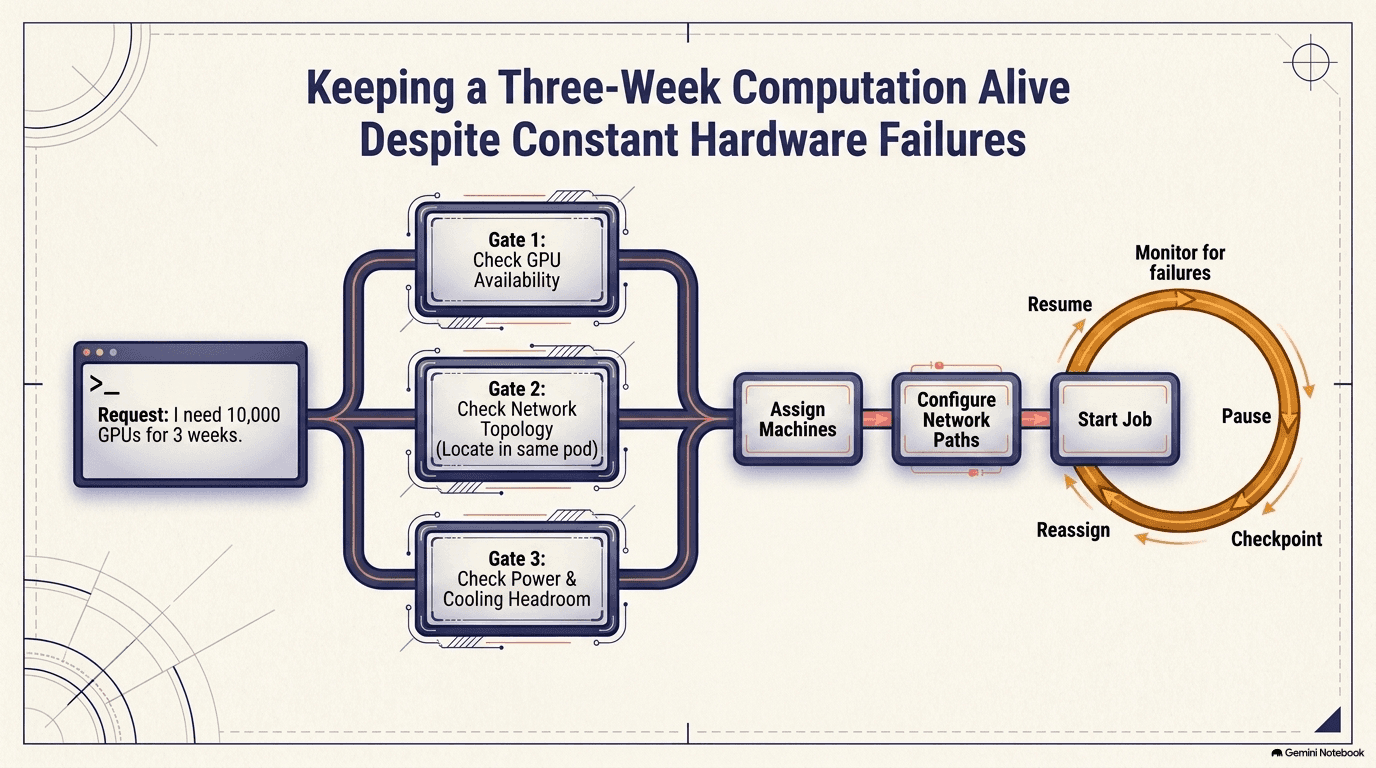
When a training job needs 10,000 GPUs, something has to decide which 10,000 — in which racks, in which building, in which physical locations relative to each other — and coordinate them all to start working together. That something is the orchestration and scheduling layer, and it is a genuinely hard problem, harder than ordinary cloud computing, for several reasons.
Placement matters. GPUs that are physically close to each other — in the same rack, connected by the same spine switch (Chapter 3) — can communicate faster than GPUs across the building. For a training job where every GPU must exchange data with every other GPU thousands of times per second, the difference between "all in one pod" and "scattered across the building" is the difference between a job that runs efficiently and one that spends most of its time waiting for data. The scheduler must understand the physical network topology and place jobs to minimize communication distance.
Failures are constant. At the scale of 100,000 GPUs, something is always failing — a GPU, a memory module, a network link, a power supply. A good rule of thumb is that in a cluster of 10,000 GPUs running for a month, a few dozen individual components will fail. The math is relentless: even if each individual GPU has 99.99% uptime (an excellent number), a cluster of 10,000 has an expected failure roughly every hour. If a training job is running across all 10,000 and a single GPU crashes, the entire job can be forced to restart from its last checkpoint — a saved snapshot of the model's state.
Checkpointing is itself expensive, and the tradeoffs are worth understanding. Saving the state of a large model means writing terabytes of data — the weights of billions of parameters, the optimizer state, the position in the training data — to a storage system. While the checkpoint is being written, every GPU in the cluster must pause its computation and wait, because the state must be captured at a consistent point. This pause can last many minutes, during which tens of millions of dollars' worth of hardware sits idle. Checkpoint too often and you waste a significant fraction of your compute on saving state rather than advancing the model. Checkpoint too rarely and you risk losing days of work when (not if) something fails. The scheduler must balance this: it needs to detect the failure, isolate the bad GPU, potentially remap the network routes around it, bring in a spare if one is available, load the last good checkpoint across all surviving GPUs, and resume the job — ideally within minutes.
Power and cooling constraints. Not every rack in a data center has the same power and cooling capacity (Chapter 6). The scheduler must know which racks have spare power headroom and sufficient cooling, and avoid placing a high-power workload somewhere the infrastructure can't support it. This is where orchestration meets DCIM — the scheduler queries the building-management system to understand the physical constraints.
Before explaining the orchestration software, one concept needs definition: a container. A container is a way to package a piece of software — the application, plus every library and configuration it depends on — into a single, self-contained unit that will run the same way regardless of what machine it's placed on. Think of it as a shipping container for software: just as a physical shipping container lets you move goods between any port without repacking, a software container lets you move an AI workload between any server without reconfiguring. Docker is the technology that popularized this concept, and virtually all AI workloads run inside containers.
The software that orchestrates all of this builds on an open-source system called Kubernetes (originally designed by Google for ordinary web services), but the AI-specific extensions are substantial enough that it's almost a different system wearing the same name. Standard Kubernetes schedules web applications onto servers; it doesn't know what a GPU is, doesn't understand network topology, and doesn't think about power and cooling constraints. The AI extensions add all of that: a device plugin that tells the scheduler which nodes have GPUs and how many; a topology-aware scheduler that understands the physical network layout and prefers to place related GPUs in the same pod or the same spine switch group; a gang scheduler that can reserve thousands of GPUs simultaneously (standard Kubernetes assigns machines one at a time, which can lead to a training job getting 9,999 of its 10,000 GPUs and waiting indefinitely for the last one); and preemption logic that can interrupt lower-priority jobs to make room for higher-priority ones.
There is a software layer beneath all of this that is worth understanding because it is one of the most significant competitive advantages in the entire AI industry. NVIDIA's CUDA is a programming platform that lets software developers write code that runs on NVIDIA GPUs. Nearly all AI training software — the frameworks, the libraries, the optimization tools — was written for CUDA over the past fifteen years, and switching to a different GPU vendor means rewriting or adapting that software. This creates a "software moat": even if a competitor builds a GPU that matches NVIDIA's hardware performance, the AI industry's accumulated investment in CUDA-based code makes switching extraordinarily expensive and slow. It is the reason NVIDIA's dominance in AI compute is about more than just chip design — it is about the ecosystem of software that only runs on its hardware.
NVIDIA provides its own cluster-management software stack that integrates with the orchestration layer, adding GPU-specific features: health monitoring that tracks each GPU's temperature, error rate, and performance characteristics; driver management that ensures the correct software is running on each GPU; and workload profiling that identifies inefficiencies (such as GPUs spending too much time waiting for data from the network or from storage). AMD provides equivalent tools for its GPUs. These vendor-specific layers are essential because the orchestrator needs intimate knowledge of the GPU hardware to schedule efficiently — knowledge that only the GPU manufacturer possesses.
Everything above describes the software for training — building a model. But there is a separate software layer for inference — using a trained model to answer questions, generate images, or write code. Inference software solves a different problem: instead of coordinating thousands of GPUs on one massive job, it routes millions of individual requests to the right GPU, batches them efficiently (grouping many small requests together so the GPU stays busy rather than processing them one at a time), and returns each answer within a few hundred milliseconds. The challenge is not scale in the training sense (one enormous job) but scale in the web-service sense (millions of small, independent, latency-sensitive requests per hour). As inference grows to consume more than half of all GPU compute (Chapter 12), this software layer is becoming as important as the training orchestrator.
Programming the Network
Chapter 3 described the physical network — the switches, the optical transceivers, the fiber. But a network with thousands of switches doesn't configure itself. Each switch needs to know: which ports connect to which devices, what routing rules to follow, how to handle congestion, and how to prioritize different types of traffic. Doing this by hand, switch by switch, would be impossibly slow and error-prone.
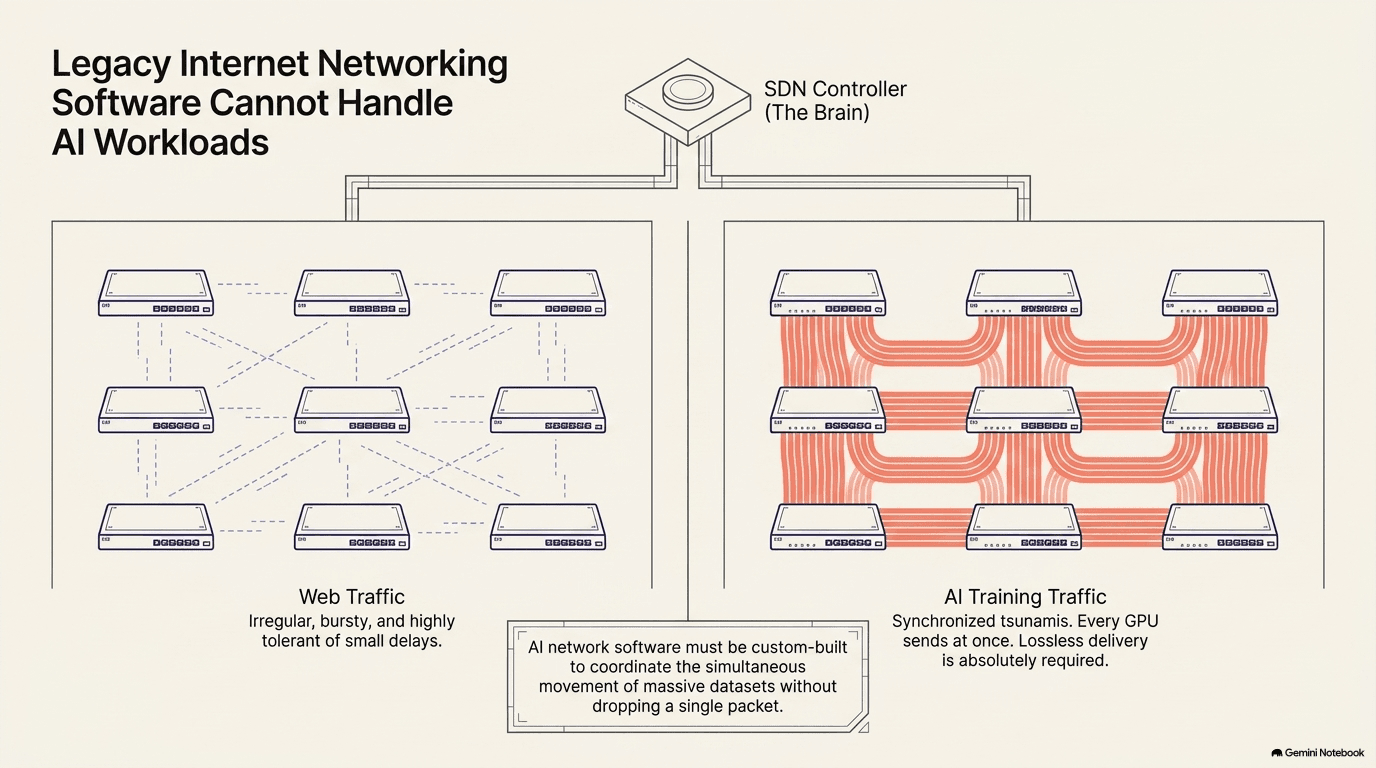
Software-defined networking (SDN) solves this by separating the control plane (the intelligence that decides how traffic should flow) from the data plane (the switches that actually move the packets). A central controller programs every switch in the building at once, and when the network needs to change — a new cluster comes online, a link fails, a training job starts that requires a specific traffic pattern — the controller reconfigures the affected switches in seconds. This is like the difference between giving driving directions to each car individually and having a traffic-control system that manages all the traffic lights at once.
The AI-specific challenge is that GPU-to-GPU training traffic has a very different pattern from ordinary internet traffic. Ordinary traffic (web browsing, email, video) is asynchronous — packets arrive at irregular intervals, and a little delay doesn't matter much. If a web page takes an extra hundred milliseconds to load, the user barely notices. Training traffic is synchronous — every GPU in a training group finishes its computation at roughly the same time and then sends its results to every other GPU at the same time. This creates massive, simultaneous bursts of traffic that can overwhelm a network designed for ordinary patterns. Imagine ten thousand fire hoses all turned on at the same instant — that's what the network sees during the communication phase of a training step.
The switches must be configured to handle these bursts using several techniques. Lossless Ethernet prevents any packet from being dropped. In ordinary networking, if a switch's buffer fills up, it simply drops packets and the sender retransmits — a minor delay for web traffic. In training traffic, a single dropped packet forces an expensive resend that holds up every other GPU waiting for that data, so the network uses a flow-control mechanism where a congested switch tells the sender to pause before the buffer overflows. Traffic engineering programs specific paths through the network to spread the load — instead of letting traffic take the shortest path (which might overload one switch while others sit idle), the controller distributes flows across multiple paths for balance. Priority classes ensure that training traffic gets precedence over less time-sensitive traffic like logging, monitoring, and software updates — a checkpoint save can wait a few seconds; a training synchronization step cannot.
A subtler networking technology called RDMA (Remote Direct Memory Access) is increasingly important for AI workloads, and it illustrates how deep the software optimization goes. Normally, when one machine sends data to another, the data passes through the CPU and operating system on both sides — the CPU copies it from the application's memory to a network buffer, the operating system handles the protocol, and the reverse happens on the receiving end. Each copy takes time and CPU cycles. RDMA bypasses all of that: the network adapter reads data directly from the sending GPU's memory and writes it directly into the receiving GPU's memory, without involving the CPU or the operating system at all. This is like the difference between passing a letter through three offices at each end versus dropping it directly on the recipient's desk. For AI training, where GPUs exchange data thousands of times per second, eliminating those copies can improve performance by ten percent or more — which, when the cluster costs millions of dollars per month to run, translates to real money.
Making RDMA work reliably at scale requires software support at every layer: the network adapters need special drivers, the switches need to support the flow-control protocols that prevent any packet loss (because RDMA has no mechanism for retransmitting lost data efficiently), and the orchestration layer needs to know which machines support RDMA and configure the connections accordingly.
Adaptive routing is another software-driven technique that becomes essential at scale. In a large network with thousands of parallel paths between any two points, the static routing approach (always use the same path for a given source-destination pair) inevitably creates hotspots — some links carry far more traffic than others. Adaptive routing lets the switches dynamically shift traffic between equivalent paths based on real-time congestion measurements, spreading the load more evenly. The sophistication is in the measurement: the switch must sense congestion building before it causes drops, and reroute traffic quickly enough to prevent the burst from overwhelming any single link — all while maintaining the packet ordering that the training job requires (reordered packets can corrupt the computation).
The operating systems built into the switches are themselves significant software. Arista (ANET) builds its switches around its EOS operating system. Broadcom (AVGO) pairs its networking silicon with software and, through VMware, provides the virtualization layer many enterprises use. Cisco (CSCO) offers its own networking and security software stack. These aren't simple firmware — they are full operating systems managing millions of flows per second, and the quality of the software determines how well the physical network (Chapter 3) actually performs.
Defending the Machine
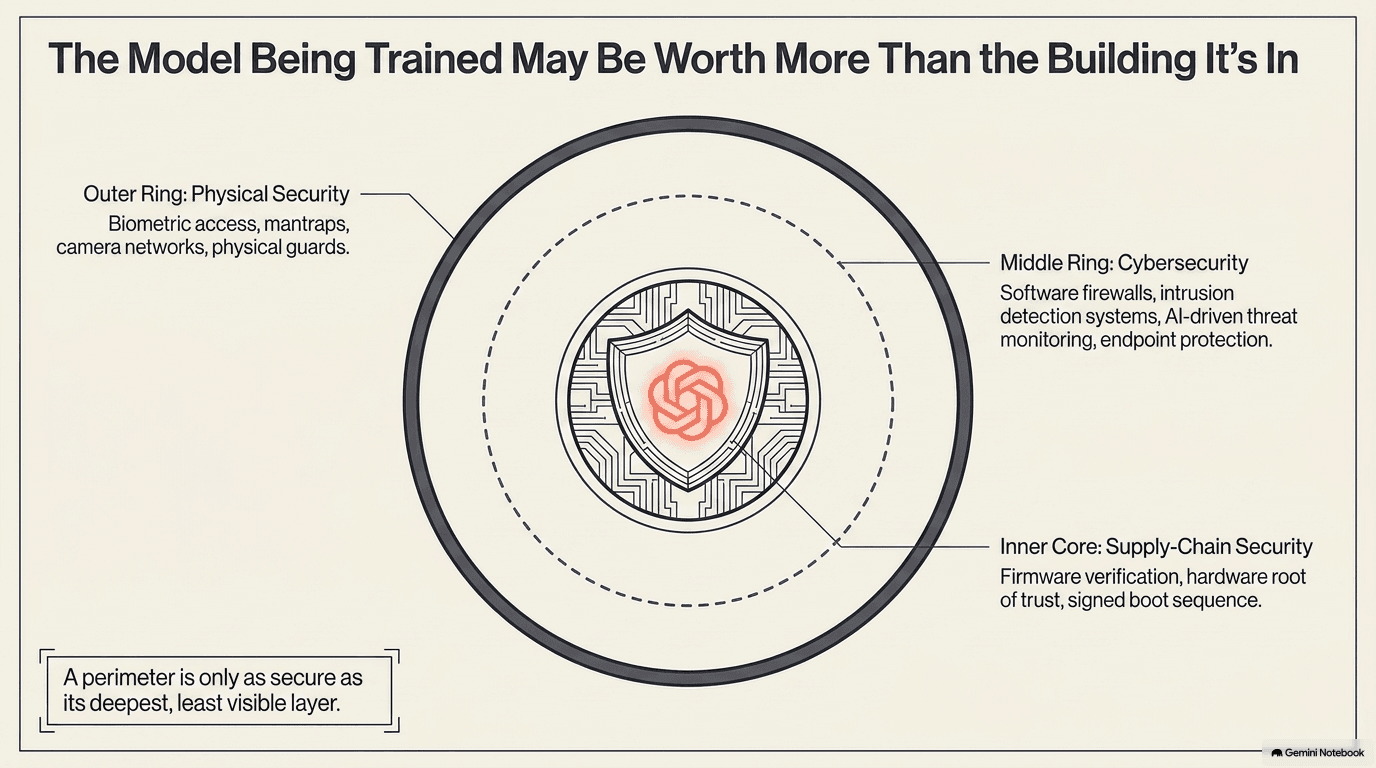
A data center full of GPUs training a frontier AI model is one of the most valuable targets in the world. The hardware itself is worth billions, but the real asset is the trained model — the result of months of computation at a cost that can exceed a hundred million dollars. Stealing a copy of that model, or disrupting the training so it has to restart, would be an enormously valuable attack. Security is therefore the one concern that touches every layer of the stack, from the physical doors to the firmware in each chip.
There are three layers. Physical security protects the building itself: biometric access control (fingerprint or iris scanners at each entrance), mantrap entries (a small room where one door must close before the other opens, preventing tailgating), continuous camera surveillance, security guards, and perimeter fencing. The most sensitive facilities resemble military installations. This was covered briefly in Chapter 4, but its importance to the AI-specific story is worth emphasizing — a frontier training cluster represents a concentration of intellectual-property value that few other civilian facilities can match.
Cybersecurity protects the network and the data. The threat model for an AI data center includes everything that threatens any internet-connected system — ransomware, phishing, denial-of-service attacks, exploitation of software vulnerabilities — plus AI-specific threats. Attackers might try to steal model weights (the mathematical parameters that encode everything the model has learned) by exfiltrating them over the network. They might try to corrupt the training data (a data-poisoning attack that would make the model produce subtly wrong outputs). They might try to disrupt the training itself (crashing GPUs, corrupting checkpoints) to waste the operator's time and money.
The security companies that protect data-center networks use a layered defense. Firewalls block unauthorized traffic at the network perimeter — only approved connections can enter or leave the facility. Intrusion-detection systems monitor the traffic that does get through, looking for suspicious patterns: unusual data transfers, connections to known malicious servers, attempts to probe internal systems. Endpoint protection secures each individual server, monitoring for unauthorized software, unusual process behavior, or unexpected file access. And increasingly, AI-powered threat detection uses machine learning to spot anomalies that rule-based systems would miss — a login from an unusual location, a data-access pattern that doesn't match the user's history, a subtle change in network traffic that could indicate data exfiltration.
CrowdStrike (CRWD) pioneered the cloud-native endpoint-protection model — a lightweight agent on each server that streams behavioral data to a central platform, where AI analyzes the behavior in context and flags anomalies that a standalone scanner would miss. Palo Alto Networks (PANW) provides firewalls and cloud security. Fortinet (FTNT) offers integrated security appliances that combine multiple defense layers in one box — firewall, intrusion prevention, VPN, web filtering — optimized for the high-throughput environments that data centers require.
There is also a zero-trust architecture concept that is increasingly important for AI data centers and worth understanding. Traditional security assumes that everything inside the network perimeter is trusted — once you're inside the firewall, you have broad access. Zero trust assumes nothing is trusted, ever: every access request, whether from inside or outside the network, must be authenticated and authorized individually. Each user, each application, each machine proves its identity for every action it takes. This is more complex to implement but dramatically more resistant to the scenario where an attacker breaches the perimeter and then moves freely inside — because in a zero-trust architecture, there is no "inside." Every door requires a separate key.
There is a recursive irony here worth noting: AI is being used to attack AI data centers, and AI is being used to defend them. Attackers use AI to generate more convincing phishing emails, to find vulnerabilities faster, to write malware that adapts to evasion attempts, and to automate the reconnaissance phase of an attack (scanning thousands of systems for specific vulnerabilities in seconds). Defenders use AI to analyze billions of events per day, to correlate signals across many systems (a failed login in Virginia and an unusual data download in Oregon might be two steps of the same attack, visible only when correlated), and to respond to threats faster than any human team could — sometimes automatically isolating a compromised machine before a human even knows the attack is happening. This arms race is likely to intensify as the value of the assets being protected grows.
Supply-chain security is the subtlest and hardest layer, and it is worth understanding in detail because it is the one that the other two layers cannot fully protect against. Every server, switch, and GPU in the data center contains firmware — small programs burned into the hardware that run when the device powers up, before the operating system loads, before the firewall activates, before any security software is running. Firmware controls the most fundamental operations: how the processor initializes, how memory is configured, how the network interface identifies itself. If an attacker could tamper with that firmware — at the factory, during shipping, or through a compromised software update — they could have persistent access to the system that no amount of network-level security would detect. The compromised firmware would be running underneath the firewall, underneath the intrusion-detection system, underneath everything — and it would survive reboots, operating-system reinstalls, even disk wipes.
The defense is a "hardware root of trust": a small, tamper-resistant chip on each device that stores cryptographic keys and verifies the integrity of the firmware at boot time. When the device powers on, the root-of-trust chip checks the firmware against a cryptographic signature before allowing it to run — if the firmware has been modified, the signature check fails, and the device refuses to boot. This creates a chain: the root-of-trust chip trusts the firmware, the firmware trusts the operating system, the operating system trusts the applications — and each link in the chain verifies the next before handing control to it.
This chain of trust extends all the way back to the chip fabs of Chapter 9. The root-of-trust chip itself was manufactured in a fab, packaged in a facility, installed on a board in a factory, and shipped across the world. At each step, there is theoretically an opportunity for tampering. This is one of the reasons that the geographic concentration of chip manufacturing is not just an economic concern but a national-security one — and it is why some governments have invested heavily in domestic semiconductor fabrication capacity, as described in Chapter 9.
The Software That Designs the Hardware — and Stores the Data
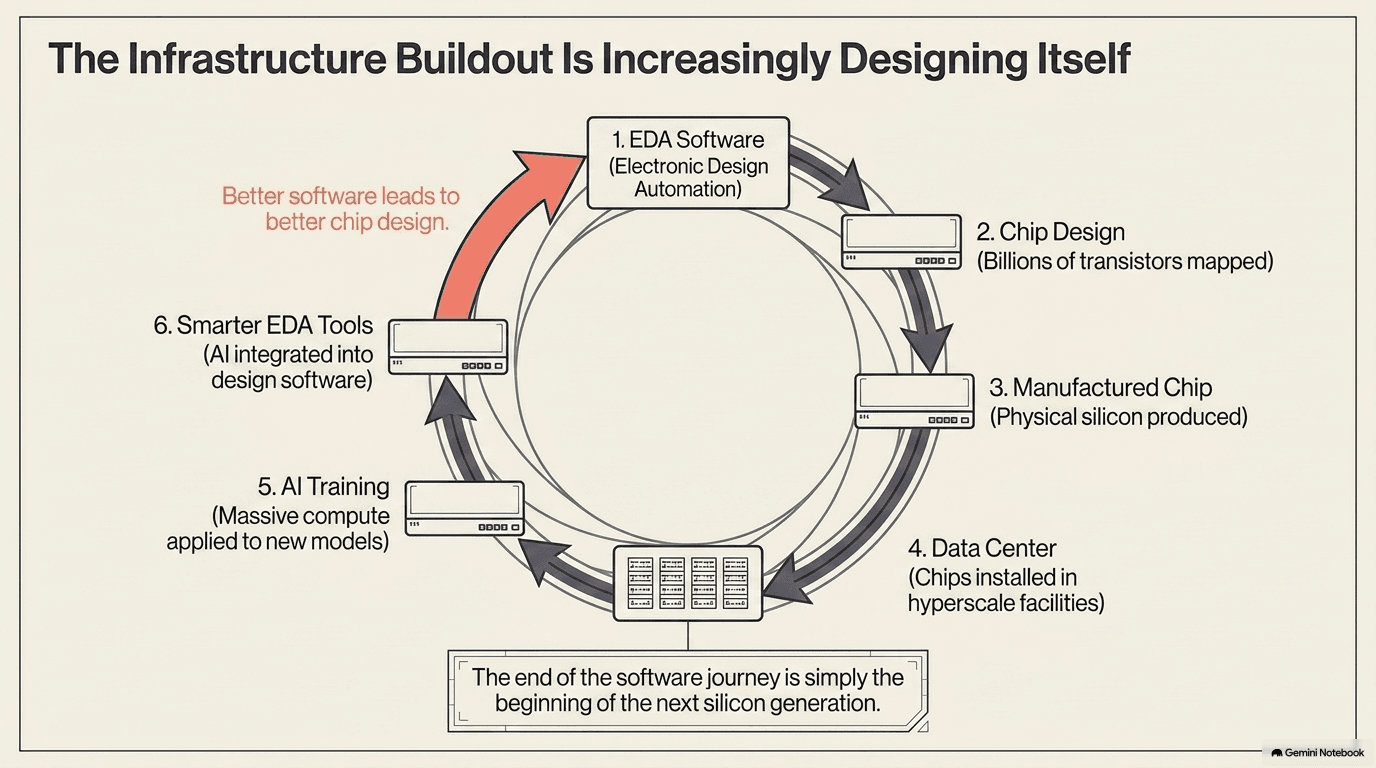
There is one more category of software that belongs in this chapter, and it closes a remarkable loop. The chips described in Chapter 1 — the GPUs, the networking ASICs, the power-management chips — are designed using EDA (electronic design automation) software: enormously complex programs that let engineers draw a circuit containing billions of transistors, simulate its behavior, verify that it will work, and generate the instructions the fab needs to manufacture it. Without EDA tools, no advanced chip can be designed. Synopsys (SNPS) and Cadence (CDNS) are effectively the only two companies that make the full suite of these tools, and every chip maker in the world is their customer. Arm (ARM) occupies a related niche: it licenses processor blueprints that a growing share of AI and data-center chips are built on.
The loop is this: EDA tools now use AI to help design chips. Consider one of the hardest tasks in chip design: place and route — deciding where each of the billions of transistors goes on the chip and how the wires connect them. The constraints are staggering: the wires must not be too long (signal delay), too close together (interference), or too many on one layer (manufacturing limitations). The power distribution must reach every transistor. The clock signal must arrive everywhere simultaneously. A human engineer working with traditional optimization algorithms might take weeks to find a good placement; an AI-augmented EDA tool can explore millions of possible arrangements and find better solutions in hours. The AI doesn't replace the core design engines or the engineer's judgment — it calls the design engines more often, trying more variations, and surfaces the best options for the engineer to evaluate.
The chips designed this way go into data centers, where they train the AI models, which in turn make the next generation of EDA tools smarter, which design the next generation of chips. The AI buildout is, increasingly, designing itself — a recursive loop that runs from silicon to software and back.
Beyond EDA, a final layer of software makes the raw hardware usable for AI workloads: the systems that store, move, and protect data.
Storage and data management software moves petabytes of training data from disk to the GPUs fast enough to keep them busy — a GPU waiting for data is a GPU wasting money and power. The scale of the data challenge is worth understanding concretely. A large language model might be trained on trillions of tokens (individual pieces of text — roughly words or word fragments), which when stored and indexed for efficient retrieval can occupy hundreds of terabytes. The training process must stream this data to the GPUs continuously, in a specific order, without repetition or gaps. The storage system must sustain read throughput of many gigabytes per second — not in bursts, but steadily, for weeks on end. And it must do this while simultaneously accepting checkpoint writes (the periodic snapshots described in section 11.3), which are themselves enormous: saving the state of a model with hundreds of billions of parameters can produce tens of terabytes of checkpoint data per save.
This creates a conflicting-demands problem. The training data flows out of storage to the GPUs (read-heavy), while the checkpoints flow into storage from the GPUs (write-heavy), and both must happen at high speed on shared infrastructure without one starving the other. The storage tier typically involves a hierarchy: the fastest layer (flash storage) holds the data currently needed, a middle tier (high-capacity disk) holds the broader training corpus, and an archival tier (tape or cold cloud storage) keeps older checkpoints and datasets that might be needed later. Software manages the movement of data between these tiers automatically — "tiering" — promoting frequently accessed data to faster storage and demoting rarely used data to cheaper, slower media.
NetApp (NTAP) makes storage systems optimized for these sustained, high-throughput AI workloads. Pure Storage (PSTG) builds all-flash arrays that can serve data fast enough to feed GPU clusters without bottlenecking. The parallel file systems that coordinate access across many storage nodes (ensuring that thousands of GPUs can all read from the same dataset without tripping over each other) are a specialized software discipline unto themselves.
Backup and resilience software protects the training data and the model checkpoints — because if the only copy of a trained model is lost, the months of computation that produced it are lost too. The cost of re-training a frontier model can exceed a hundred million dollars, making model weights one of the most expensive files in the world, dollar-for-dollar. Rubrik (RBRK) extends cyber-resilience to AI workloads, ensuring that these critical files are backed up, encrypted, and recoverable even after a ransomware attack or a catastrophic storage failure. Commvault (CVLT) provides enterprise data protection that spans the full data lifecycle.
The protection challenge goes beyond traditional backup. A training checkpoint must be consistent — all the GPU states captured at exactly the same logical moment. If part of the checkpoint is corrupted or lost, the entire thing may be unusable, and the training must roll back to an earlier (older, less valuable) checkpoint. The storage and backup layer's job is to guarantee that every checkpoint, once written, can be fully restored to exactly the state it was captured in — no bit errors, no missing pages, no half-written files. For a checkpoint that might be 50 terabytes written across hundreds of storage targets in parallel, achieving that consistency guarantee is a non-trivial engineering problem. As training data and model weights become among the most valuable assets a company owns, protecting and serving them becomes its own essential layer.
Next: Chapter 12 — The Operators (the companies that own and rent out all this compute)
Companies in this part of the buildout: Software & Design